


Blaine Brown · @blizaine
Maestro Long-Video Reference Windows
Maestro demonstrates H3 reference editing of longer stock footage by splitting it into windows for character swaps and effects.
Prompt non pubblicatoMostra dettagli
Prompt verificati e fonti originali
Studia i prompt pubblicati dai creator insieme ai loro video MiniMax H3 completati. Scopri come si combinano regia della scena, movimento, camera, continuità e suono.
Ogni esempio rimanda alla fonte originale. Copia il prompt pubblicato così com’è oppure adattane la struttura alla tua scena.
706 esempi verificati
Sfoglia gli esempi MiniMax H3 per tecnica di ripresa, storyboard, animazione, controllo tramite riferimenti, musica, dialoghi o motion graphics. Gli esempi con prompt pubblicati e quelli dedicati solo al workflow sono chiaramente indicati.
83 esempi trovati · Risultati 31–60
Esplora esempi di generazione da immagine a video, video di riferimento e sostituzione dei personaggi realizzati con MiniMax H3. Mostrano diversi modi per preservare l’identità, guidare il movimento, animare una fotografia o trasferire uno stile visivo. Prima di adattare un prompt pubblicato, identifica il ruolo di ogni riferimento: aspetto, movimento e stile della scena possono provenire da input diversi. La sostituzione dei personaggi e i workflow locali con riferimenti possono richiedere strumenti aggiuntivi. Controlla somiglianza del volto, abiti, illuminazione e occlusioni nell’intero video finito, non solo nel primo fotogramma.
Blaine Brown · @blizaine
Maestro demonstrates H3 reference editing of longer stock footage by splitting it into windows for character swaps and effects.
ミチル|今日もAIが気になる · @michiru_aixbtj
A robot added to an empty gallery picks up a ball and passes behind a pillar, while a requested one-second run takes about three.

えふのじ · @fnoji
A creator shares H3 source clips and a glasses variant while reporting persistent oversized eyes and character-detail inconsistency.
 MiniMax H3 Max
Idorenyin Joseph | AI Video creator · @IddyJosephh
A widely viewed two-video comparison labels the first result H3 Max and the second Gemini Omni Flash.
 MiniMax H3
Day of the Answer · @DayoftheAnswer
A creator labels a ComfyUI H3 result as Blender to Anime, combining 3D-source design with an anime treatment.

えふのじ · @fnoji
A character-reference preparation study pairs an anime output with a published sheet, without using Blender or other DCC tools.
 MiniMax H3
Md Ismail Šojal 🕷️ · @0x0SojalSec
A locally generated celebrity likeness demonstrates identity conditioning with a reported 155 MB LoRA and no reference images.

akatz · @akatz_ai
An original, green-mask and person-removed comparison demonstrates an H3 LoRA used to prepare character-swap training samples.

1つ目クロスケ · @HitotsumeKuro
Two H3 anime outputs hold seed and references constant while the author investigates prompt-driven character duplication.

Graalito · @Graalitoo
An H3 Max video-reference experiment achieves synchronized dual viewpoints once, while its author reports many failed attempts.

元荒川ちゃん❤ · @mtArakawa
An H3 group-flight test adds individual character instructions after unspecified actions made everyone move identically.
 MiniMax H3
WBK · @WBK_SZ
A creator switches an action sequence from R2V to I2V after repeated difficulty and retains visible roughness in the local H3 result.
 MiniMax H3
ふとし · @mmmpa
A single-photo 360° LoRA test exposes an invented tail as H3 fills in character details absent from the reference view.
 MiniMax H3
wasabi_vaio · @WasabiVaio
Krea2 helicopter stills guide H3 animation of a large science-fiction helicopter formation.
 MiniMax H3 Max
𝐙𝐞𝐧𝐠 💜 · @zeng_wt
A pastel surreal base frame made with Muse Image is animated with H3 Max in a dream-state study.
 MiniMax H3
buchi_ · @mix_buchi_
A kimono character study is generated with H3 Ref2V using the Singularity model according to its creator.
 MiniMax H3
monoradio · @monoradio102
A manga prototype combines H3 and ORB360 LoRA for adjustable viewpoints, with character references used to stabilize faces.
 MiniMax H3
FoldingEnd A.I. · @EndFolding79421
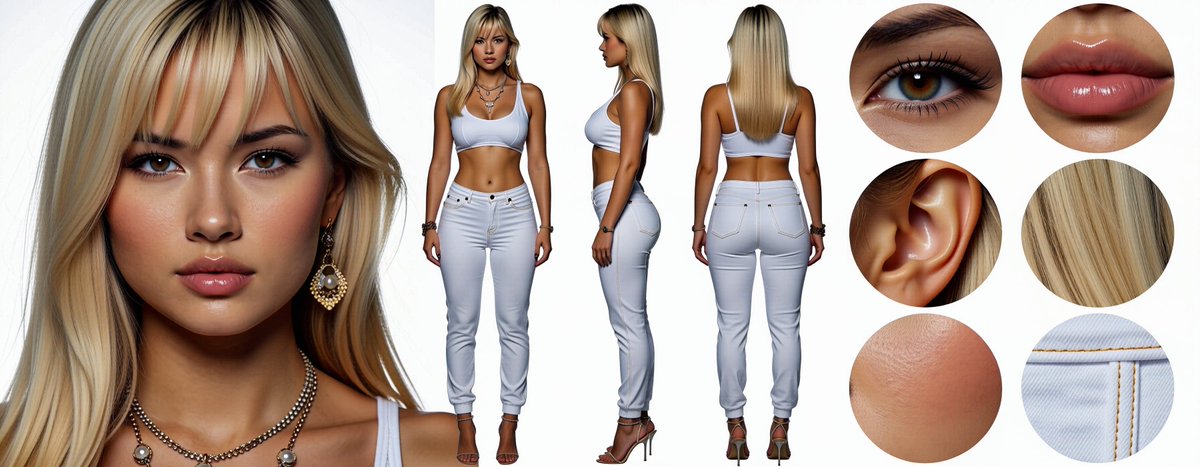
A ComfyUI H3 workflow test publishes realistic and anime character sheets with face, body and detail views.
 MiniMax H3
huangserva · @servasyy_ai
A side-by-side RTX 4090 test compares three-view Ref2VA orbit guidance with a single-image first/last-frame loop.
 MiniMax H3
Kent Dhani · @kentdhani
A local RTX 5090 test replaces three Jurassic World raptors at once rather than swapping one isolated character.
 MiniMax H3
buchi_ · @mix_buchi_
A frog-shaped robot is animated with H3 Ref2V using Singularity and an LLM-written prompt.
 MiniMax H3
Satsuki AI Log · @SatsukiAILog
A background-and-person Reference Edit test improves placement but changes the face and skin texture, according to its author.
 MiniMax H3 Max
Jerrod Lew · @jerrod_lew
One reference image becomes draft images in Magnific One, H3 Max video clips and an edited spec ad with ElevenLabs audio.

akatz · @akatz_ai
H3 Ref2VA transfers performances with a character V1 LoRA, prompting and masking in a side-by-side development reel.
 MiniMax H3
Kamimoto(かみもと) · @sep_is_heim
An anime-character test combines start and end images with a Transformation LoRA and a prompt.

さんかくてん · @sankakuten91256
A labeled comparison tests H3, Seedance and Wan against previs, depth, line art and a character reference in five-second sections.

バスケットマン(基本無課金 多垢100連ガチャ) · @kaimakulink
A creator uses Gemini to reconstruct an H3 anime-to-live-action workflow from a LoRA description, showing a graph and a short result.
 MiniMax H3
LinacoWSL · @breath_in_code
A local 20-second H3 clip uses one person image and one chibi image, with prompting rather than a storyboard or LoRA.
 MiniMax H3
kongo jun / 混合 順 · @jun_kongo
A creator publishes a video tutorial about using a FaceSwap LoRA with MiniMax H3 in ComfyUI.
 MiniMax H3
なまなり あい · @AiNamanari33743
A sunset-train experiment pairs an H3 character result with a simplified previsualization across multiple angles.
Usa la raccolta
Considera ogni esempio come una struttura riutilizzabile. Mantieni le parti che controllano il movimento e la continuità, poi sostituisci i dettagli creativi della scena originale.
Sfoglia una categoria o cerca per soggetto, tecnica di ripresa, creator o modello. Scegli un esempio con movimenti e struttura adatti al video che vuoi creare.
Copia il testo pubblicato, se disponibile, e verifica se è un prompt completo o un estratto. Per gli esempi senza prompt, studia la fonte e le note di adattamento.
Inserisci il tuo soggetto e la tua ambientazione, fornisci i media di riferimento necessari e controlla tutti i vincoli prima di generare.
Copia un esempio verificato, adatta i dettagli creativi e genera il tuo video con MiniMax H3.