


Blaine Brown · @blizaine
Maestro Long-Video Reference Windows
Maestro demonstrates H3 reference editing of longer stock footage by splitting it into windows for character swaps and effects.
Prompt no publicadoVer detalles
Prompts verificados y fuentes originales
Estudia los prompts publicados por creadores junto a sus vídeos terminados con MiniMax H3. Descubre cómo combinan la dirección de escena, el movimiento, la cámara, la continuidad y el sonido.
Cada ejemplo enlaza a su fuente original. Copia el prompt publicado tal cual o adapta su estructura a tu propia escena.
706 ejemplos verificados
Busca ejemplos de MiniMax H3 por técnica de cámara, storyboard, animación, control por referencias, música, diálogo o gráficos en movimiento. Los ejemplos con prompt publicado y los que solo muestran el flujo de trabajo están claramente identificados.
83 ejemplos encontrados · Mostrando 31–60
Explora ejemplos de imagen a vídeo, vídeo de referencia y sustitución de personajes creados con MiniMax H3. Muestran distintas formas de preservar la identidad, guiar el movimiento, animar una fotografía o transferir un estilo visual. Identifica el papel de cada referencia antes de adaptar un prompt publicado: la apariencia, el movimiento y el estilo de la escena pueden proceder de entradas diferentes. La sustitución de personajes y los flujos locales con referencias pueden requerir herramientas adicionales. Revisa el parecido facial, la ropa, la iluminación y las oclusiones en todo el vídeo terminado, no solo en el primer fotograma.
Blaine Brown · @blizaine
Maestro demonstrates H3 reference editing of longer stock footage by splitting it into windows for character swaps and effects.
ミチル|今日もAIが気になる · @michiru_aixbtj
A robot added to an empty gallery picks up a ball and passes behind a pillar, while a requested one-second run takes about three.

えふのじ · @fnoji
A creator shares H3 source clips and a glasses variant while reporting persistent oversized eyes and character-detail inconsistency.
 MiniMax H3 Max
Idorenyin Joseph | AI Video creator · @IddyJosephh
A widely viewed two-video comparison labels the first result H3 Max and the second Gemini Omni Flash.
 MiniMax H3
Day of the Answer · @DayoftheAnswer
A creator labels a ComfyUI H3 result as Blender to Anime, combining 3D-source design with an anime treatment.

えふのじ · @fnoji
A character-reference preparation study pairs an anime output with a published sheet, without using Blender or other DCC tools.
 MiniMax H3
Md Ismail Šojal 🕷️ · @0x0SojalSec
A locally generated celebrity likeness demonstrates identity conditioning with a reported 155 MB LoRA and no reference images.

akatz · @akatz_ai
An original, green-mask and person-removed comparison demonstrates an H3 LoRA used to prepare character-swap training samples.

1つ目クロスケ · @HitotsumeKuro
Two H3 anime outputs hold seed and references constant while the author investigates prompt-driven character duplication.

Graalito · @Graalitoo
An H3 Max video-reference experiment achieves synchronized dual viewpoints once, while its author reports many failed attempts.

元荒川ちゃん❤ · @mtArakawa
An H3 group-flight test adds individual character instructions after unspecified actions made everyone move identically.
 MiniMax H3
WBK · @WBK_SZ
A creator switches an action sequence from R2V to I2V after repeated difficulty and retains visible roughness in the local H3 result.
 MiniMax H3
ふとし · @mmmpa
A single-photo 360° LoRA test exposes an invented tail as H3 fills in character details absent from the reference view.
 MiniMax H3
wasabi_vaio · @WasabiVaio
Krea2 helicopter stills guide H3 animation of a large science-fiction helicopter formation.
 MiniMax H3 Max
𝐙𝐞𝐧𝐠 💜 · @zeng_wt
A pastel surreal base frame made with Muse Image is animated with H3 Max in a dream-state study.
 MiniMax H3
buchi_ · @mix_buchi_
A kimono character study is generated with H3 Ref2V using the Singularity model according to its creator.
 MiniMax H3
monoradio · @monoradio102
A manga prototype combines H3 and ORB360 LoRA for adjustable viewpoints, with character references used to stabilize faces.
 MiniMax H3
FoldingEnd A.I. · @EndFolding79421
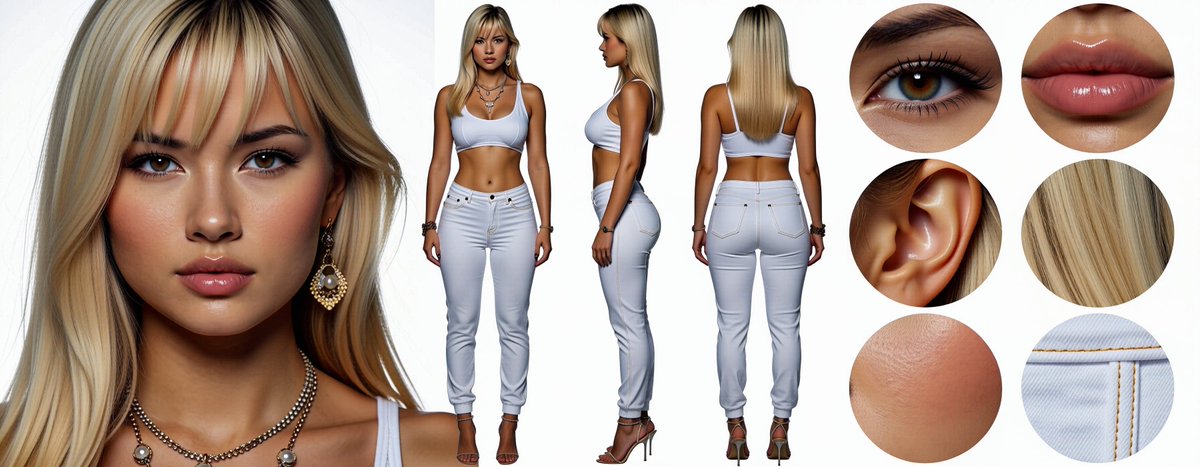
A ComfyUI H3 workflow test publishes realistic and anime character sheets with face, body and detail views.
 MiniMax H3
huangserva · @servasyy_ai
A side-by-side RTX 4090 test compares three-view Ref2VA orbit guidance with a single-image first/last-frame loop.
 MiniMax H3
Kent Dhani · @kentdhani
A local RTX 5090 test replaces three Jurassic World raptors at once rather than swapping one isolated character.
 MiniMax H3
buchi_ · @mix_buchi_
A frog-shaped robot is animated with H3 Ref2V using Singularity and an LLM-written prompt.
 MiniMax H3
Satsuki AI Log · @SatsukiAILog
A background-and-person Reference Edit test improves placement but changes the face and skin texture, according to its author.
 MiniMax H3 Max
Jerrod Lew · @jerrod_lew
One reference image becomes draft images in Magnific One, H3 Max video clips and an edited spec ad with ElevenLabs audio.

akatz · @akatz_ai
H3 Ref2VA transfers performances with a character V1 LoRA, prompting and masking in a side-by-side development reel.
 MiniMax H3
Kamimoto(かみもと) · @sep_is_heim
An anime-character test combines start and end images with a Transformation LoRA and a prompt.

さんかくてん · @sankakuten91256
A labeled comparison tests H3, Seedance and Wan against previs, depth, line art and a character reference in five-second sections.

バスケットマン(基本無課金 多垢100連ガチャ) · @kaimakulink
A creator uses Gemini to reconstruct an H3 anime-to-live-action workflow from a LoRA description, showing a graph and a short result.
 MiniMax H3
LinacoWSL · @breath_in_code
A local 20-second H3 clip uses one person image and one chibi image, with prompting rather than a storyboard or LoRA.
 MiniMax H3
kongo jun / 混合 順 · @jun_kongo
A creator publishes a video tutorial about using a FaceSwap LoRA with MiniMax H3 in ComfyUI.
 MiniMax H3
なまなり あい · @AiNamanari33743
A sunset-train experiment pairs an H3 character result with a simplified previsualization across multiple angles.
Usa la colección
Usa cada ejemplo como una estructura reutilizable. Conserva las partes que controlan el movimiento y la continuidad y sustituye los detalles creativos de la escena original.
Explora una categoría o busca por sujeto, técnica de cámara, creador o modelo. Elige un ejemplo cuyo movimiento y estructura encajen con el vídeo que quieres crear.
Copia el texto publicado cuando esté disponible y comprueba si es un prompt completo o un fragmento. En los ejemplos sin prompt, estudia la fuente y las notas de adaptación.
Introduce tu propio sujeto y entorno, aporta los medios de referencia necesarios y revisa todas las restricciones antes de generar.
Copia un ejemplo verificado, adapta los detalles creativos y genera tu propio vídeo con MiniMax H3.