


Maurice Bourdon · @MauriceBourdon
Local Context-Connected Loop
Multiple locally generated text-to-video segments are context-connected into a continuous two-minute visual loop.
Prompt non publiéVoir les détails
Prompts vérifiés et sources originales
Étudiez les prompts publiés par des créateurs avec leurs vidéos MiniMax H3 terminées. Découvrez comment se combinent mise en scène, mouvement, caméra, continuité et son.
Chaque exemple renvoie à sa source originale. Copiez le prompt publié tel quel ou adaptez sa structure à votre propre scène.
706 exemples vérifiés
Parcourez les exemples MiniMax H3 par technique de caméra, storyboard, animation, contrôle par référence, musique, dialogue ou motion design. Les prompts publiés et les exemples de workflow seuls sont clairement identifiés.
214 exemples trouvés · Affichage : 1–30
Parcourez des workflows complémentaires MiniMax H3 pour ComfyUI, l’inférence locale, l’accélération, la prolongation de vidéos et la postproduction. Il s’agit d’exemples de workflows et de comparaisons, pas d’une bibliothèque de prompts à copier. Consultez les sources originales pour les réglages et outils publiés par les auteurs, et comparez la qualité autant que les temps d’exécution annoncés. Les tests matériels dépendent de leur configuration précise. Gardez les mêmes entrées et conditions de génération pour évaluer un changement, et vérifiez que la source fournit assez de détails pour le reproduire.
Maurice Bourdon · @MauriceBourdon
Multiple locally generated text-to-video segments are context-connected into a continuous two-minute visual loop.

Kent Dhani · @kentdhani
A side-by-side comparison highlights how a MiniMax H3 fine-tune changes feather detail and quality during movement.
 MiniMax H3
グラビアのAI美少女 · @DateAIko_SD24
An eight-second H3 experiment using a four-step LoRA on a 12 GB RTX 4070 with 32 GB system RAM.
 MiniMax H3 (FastH3 V2)
有趣的80后程序员 · @sunbaolong_2001
A local action workflow combines FastH3 V2, two-stage latent upscaling and a dual-pass face fix.
 MiniMax H3
aicreataro · @aicreataro
A ten-second H3 green-screen character is keyed into an After Effects space with animated cameras and lights.
Alex Shev · @AlexshevPm
A ComfyUI workflow passes ten seconds of video and audio context into subsequent sections before latent upscaling.

Wildminder · @wildmindai
An H3 style LoRA explores retro science fiction with cyborgs, laser guns and synthesizer sound.

CALMDUST aka ちゃんこあ · @core_tan
A WebUI test combines RefMod with three-step Ref2VA generation at 768p on an A100 80 GB.
Stable Diffusion Tutorials · @SD_Tutorial
A work-in-progress reference adapter compresses image or video references into small latents without training.

鈴木憂一 | Highdrama · @yu_ichi_suzuki
An experiment applies TaoMate by block group and resumes a three-step preview to an eight-step render.
 MiniMax H3
Solutions Joe · @SolutionsJoeG
A 40-second restaurant promo turns food and terrace photos into H3 footage, then adds tracked graphics and a sound mix.
 MiniMax H3
石ちゃん🎤LLMでアプリ開発 · @Isichan_Hitori
A local ComfyUI experiment removes token_refiner to test higher-resolution H3 generation within a fixed VRAM budget.

CALMDUST aka ちゃんこあ · @core_tan
A RefMod demo pairs an eight-second H3 result with icon-based reference management and prompt-tag insertion.
 MiniMax H3
えふのじ · @fnoji
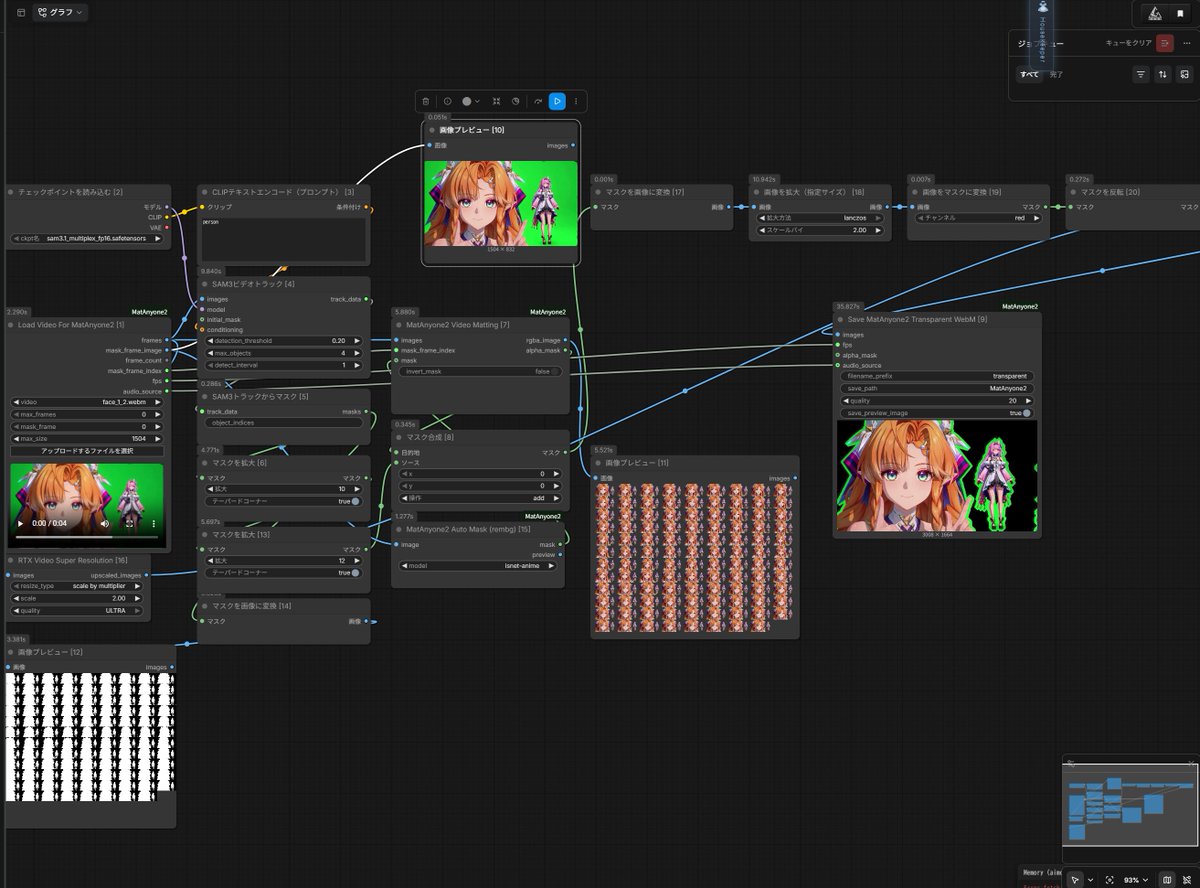
H3 green-screen output passes through SAM3, MatAnyone and RTX VSR; retained green outlines aid final keying.

Yogi Seezatnap · @seezatnap
An agent-led experiment gives Opus access to local H3 on an RTX 5090 for roughly four hours of video work.
 MiniMax H3
MindfulReturn 身心修复局 · @MindfulReturn
A local Qwen agent makes prompts and first-frame images, chains ten-second H3 clips and joins the sequence.

LerSent · @LerSentAI
A deployed scrolling outfit-change webpage combines MiniMax Code development with H3 video generation.

Victor · @victor_explore
A RunPod H3 workflow scripts, voices, generates and reviews a reported 27 promotional reels for a baby kick counter app.

CALMDUST aka ちゃんこあ · @core_tan
A WebUI 1.6 example combines Ref2VA, two-step PDMD and RefMod, reporting 124 frames generated in 35.9 seconds.

🟢DeepForest_Studio_AI🟢 · @DeepForest_Inc
A side-by-side test compares INT8 ConvRot, Standard and LynnReal Light VAE processing after the same H3 sampler conditions.

shi3z · @shi3z
A local H3 demonstration on DGX Spark reports roughly twice the speed using training-free Layer Adaptive SLA.

Kamimoto(かみもと) · @sep_is_heim
An RTX 4070 I2V example reports 124-frame TaoMate H3 output in 2:26, with a follow-up publishing its ComfyUI optimizations.
Greg Horvay · @greg_horvay
An Intel B70 H3 workflow reports a 1344×768, 107-frame Ref2VA clip dropping from 42 minutes to about nine.

Inner-Reflections · @InnerRefle11312
A local H3 demonstration explores temporal upscaling as a way to improve generated video results.
 MiniMax H3
ゆずき · @uzuki425
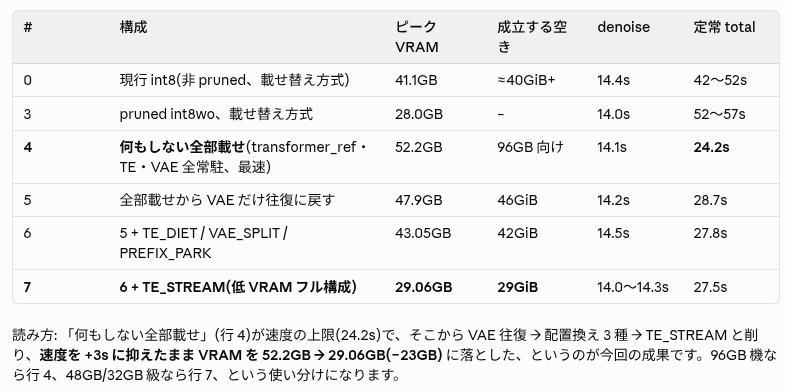
A Japanese H3 experiment shares a memory-optimization table and contrasts optimized execution with slower low-VRAM offloading.
 MiniMax H3
Kamimoto(かみもと) · @sep_is_heim
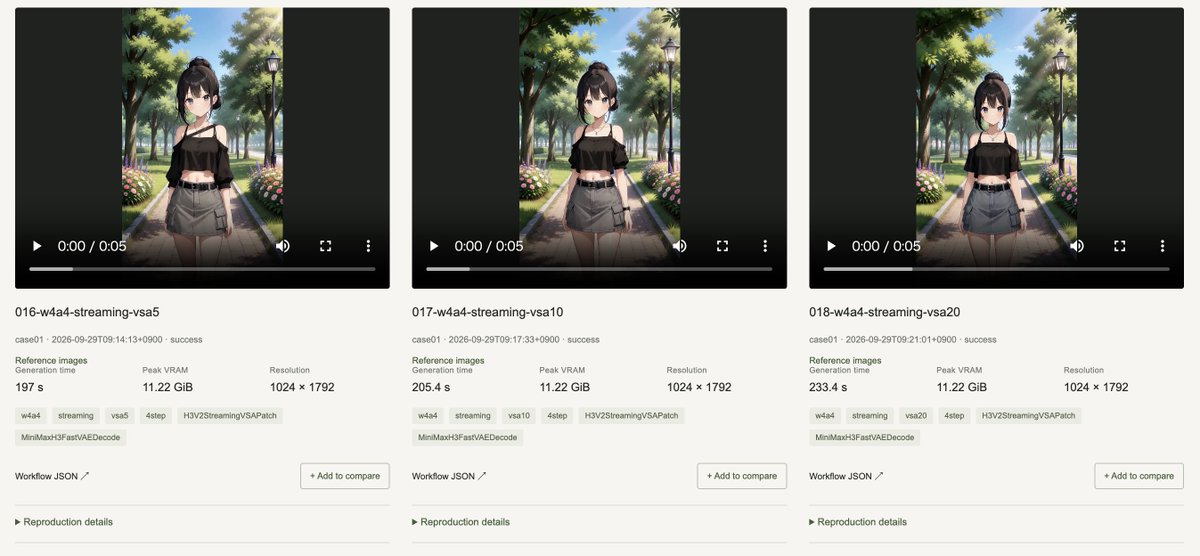
A 12GB RTX 4070 benchmark library compares Ref2VA and FL2VA outputs and provides downloadable generation workflows.

烁皓 · @eternityspring
A Kung Fu Panda example joins two H3 segments by preserving 22 motion-context frames and trimming the overlap.

rebekah · @bekhovsgun
A stateful backend drives H3 Max Turbo video UI, with mouse and keyboard events triggering fresh prompts and last-frame transitions.
☬ŘØβØ༒ƤŞ¥ĆĦØ☬ · @RobopsychoAi
An RTX 4090 user shares a two-pass latent-upscaler workflow with 20-step and four-step options for local H3 clips.

Andy Orsow · @andyorsow
Andy Orsow demonstrates using H3 Max Turbo on fal for quick concept exploration and early prompt tests before video production.
Utiliser la collection
Considérez chaque exemple comme une structure réutilisable. Conservez les éléments qui contrôlent le mouvement et la continuité, puis remplacez les détails créatifs propres à la scène originale.
Parcourez une catégorie ou recherchez par sujet, technique de caméra, créateur ou modèle. Choisissez un exemple dont les mouvements et la structure correspondent à la vidéo souhaitée.
Copiez le texte publié lorsqu’il est disponible et vérifiez s’il s’agit d’un prompt complet ou d’un extrait. Pour les exemples sans prompt, étudiez la source et les conseils d’adaptation.
Insérez votre sujet et votre décor, fournissez les médias de référence nécessaires et vérifiez toutes les contraintes avant de générer.
Copiez un exemple vérifié, adaptez les détails créatifs et générez votre propre vidéo avec MiniMax H3.