

 MiniMax H3
Glenn Williams · @GlennHasABeard
White Ink Ghost in a Locked Glass Shot
A fixed-camera H3 experiment revises white ink in dark water so a sinking drop stretches into a ghost before spreading.
出典を確認したプロンプトと元の投稿
クリエイターが公開したプロンプトを、完成した MiniMax H3 動画とあわせて確認できます。シーンの演出、動き、カメラワーク、連続性、音声をどう組み合わせているか学べます。
すべての事例に元の出典へのリンクがあります。公開プロンプトをそのままコピーすることも、構成を自分のシーンに合わせてアレンジすることもできます。
確認済みの事例 706 件
カメラ技法、絵コンテ、アニメーション、参照素材の制御、音楽、会話、モーショングラフィックスから事例を探せます。プロンプト公開済みの事例と、ワークフローのみの事例を区別して表示しています。
706 件の事例が見つかりました · 601〜630 件目を表示
MiniMax H3Glenn Williams · @GlennHasABeard
A fixed-camera H3 experiment revises white ink in dark water so a sinking drop stretches into a ghost before spreading.
「take7|AI動画ラボ」 · @KRhxLIrwOLxIjfU
A fictional cola ad comparison reports H3 as the only tested model to spell SORA COLA correctly on one line.
 MiniMax H3
Fairu 🕵️♂️ · @Fairu_90
An Ocean Network template test uses H3 text-to-video and synced audio for an unusual ASMR concept with a difficult viewpoint.
 MiniMax H3
きゅうす のAIとつれづれ · @Ai_Quse
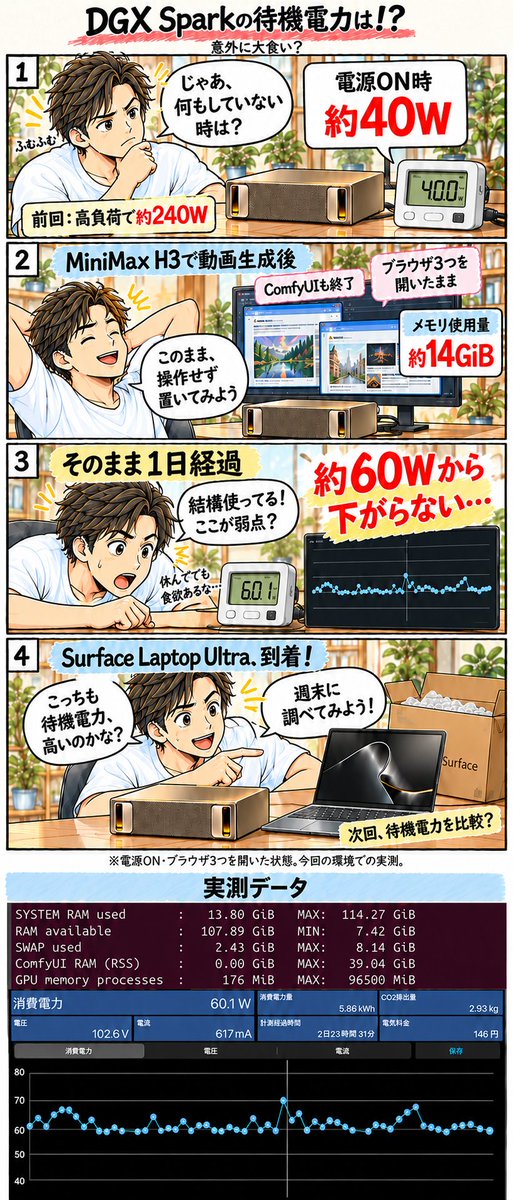
A creator reports roughly 60W idle draw after an H3 run and closing ComfyUI, compared with about 40W after power-on.
 MiniMax H3
たくぞー|AI動画ツール実測レビュー · @tkz_aiart
A side-by-side workflow uses H3 gray-character previs to guide blocking and timing in a Seedance 2.5 live-action finish.
 MiniMax H3 Max Turbo
sorastg524 · @sorastg524
An H3 Max Turbo fantasy clip pairs a moonlit fox-spirit character with deep red lantern light.
 MiniMax H3
ダルトワ★TV · @MireilleDartois
A video-reference test recommends lower-resolution dance guides for speed, while retaining detail for facial expressions and fingers.
 FastH3-QAD-v2 (MiniMax H3 derivative)
ata · @atasrb
A same-seed Tokyo test reports 18.6 versus 8.1 minutes on DGX Spark, with reduced small-text and facial detail in QAD-v2.
 MiniMax H3
taiti · @taitimusic
A vertical music promo uses H3 animation with Opus 5.5 and JIZURA text motion for a mobile-game presentation.
まぷて · @mapte_fireball
A creator builds a small app to trim long reference videos to selected sections under 15 seconds and reduce their resolution.
 MiniMax H3
みと Visuals×AI · @mito_ai_la
An H3 city-sky action study tests gliding movement and camera paths among urban buildings.
 FastH3 Omni (MiniMax H3 derivative)
Jiao Dong · @jd_markovchain
A Nuva Lab creator presents a shot-by-shot short made with FastH3 Omni and a creative agent over two afternoons.
 MiniMax H3
Md Ismail Šojal 🕷️ · @0x0SojalSec
A local H3 clip demonstrates an Anya Taylor-Joy likeness using a published 155MB LoRA and no reference images.
 MiniMax H3
tazmannner · @tazmannner
A creator’s H3 hires-fix node renders near 1MP before upscaling to 1080p, reporting 492 to 237 seconds versus native 2MP.
 MiniMax H3
StarSource · @StarSourceH
A creator adds a self-speaking video reference to H3 and reports less exaggerated mouth motion at a higher 1.2MP setting.
 MiniMax H3
Alessandro Fazenda · @adrfazenda
A local H3 experiment uses a Claude-created workflow for an extended staged conversation clip.
 SolarRenderer (MiniMax H3 derivative)
Guian Fang · @Enderfga
SolarRenderer uses H3-based control and distilled LoRAs to restyle engine structure passes with a reference first frame.
 MiniMax H3 Max
Kōrerotronix · @Amurinoble
An eight-second H3 Max title-card example uses a Transformers space setting for an animated franchise-style reveal.
 MiniMax H3
zev · @zevoo
A creator combines a Suno song with H3 visuals in an extended music video whose preview features a dewdrop on grass.
 MiniMax H3
PhotoX86 · @PhotoX86
A roughly 30-second H3 segmented-video attempt builds a comedy premise around finding a restroom.

robert. · @robrtcode
A surfer demonstration uses Pruna’s H3-based reference model to keep the subject and board consistent across changing angles.

Glenn Williams · @GlennHasABeard
A fixed low camera frames a corn row while a short prompt isolates invisible bootprints; the creator describes correcting their direction.

Alice The Ai Expert · @AliceInfoAi
A labeled three-model collage comparison contrasts oversized letters, cutouts and eyes, with MiniMax H3 in the middle panel.

Higgsfield AI 🧩 · @higgsfield_ai
A labeled split-screen compares rotating feathered wings in H3 and Claude Opus 5.5, focusing on detail, lighting and depth.
 MiniMax H3
びおめた · @malariadx
A ComfyUI example uses a TextGenerate node with an H3-oriented system prompt and pairs its workflow screenshot with an anime clip.

Glenn Williams · @GlennHasABeard
A locked window shot defines a handprint as untouched glass while frost spreads from one corner in one direction.
 FastH3 Omni (MiniMax H3-based)
buchi_ · @mix_buchi_
An anime-action test documents the creator’s concerns about limited motion and stereo width in an eight-step FastH3 Omni result.
 FastH3 Omni / MiniMax H3 + LightX2V Ref2V Turbo
まぷて · @mapte_fireball
A shared-reference, prompt and seed comparison reports 301s for Omni and 313s for LightX2V Ref2V Turbo at 1024×576.
 MiniMax H3 / FastH3 Omni
🟢DeepForest_Studio_AI🟢 · @DeepForest_Inc
A five-second R2V test compares base H3, Omni, Kitchen and VSA, reporting faster renders alongside facial artifacts.

EasyChen · @easychen
A creator’s 22-shot short-drama study reports improved voice similarity and faster-motion clarity, with wardrobe leakage onto extras.
プロンプト集の使い方
各事例を再利用できる構成として捉えましょう。動きや連続性を制御する部分を残し、元のシーン固有の創作要素を置き換えます。
カテゴリを閲覧するか、被写体、カメラ技法、クリエイター、モデルで検索します。作りたい動画に動きや構成が近い事例を選びましょう。
テキストが公開されている場合は、完全なプロンプトか一部の抜粋かを確認してコピーします。未公開の事例は、出典とアレンジのヒントを参考にしてください。
被写体や舞台を自分のものに変更し、必要な参照素材を用意して、生成前にすべての制約を確認しましょう。
確認済みの事例をコピーし、創作要素をアレンジして、MiniMax H3 で自分の動画を生成しましょう。