
First and last frames specify the endpoints of a shot. A middle frame adds a target for the action between them: a halfway-open product case, a turning pose, or a particular composition during a reveal. It can make your intended progression clearer than endpoints alone.
fal announced this control on October 2, 2026 for H3 Max Reference-to-Video. Below is a documentation-based guide to planning inputs and constructing a request. H3Vid has not tested the endpoint's output or integrated its middle-frame field.
The fields and constraints that matter
The official API schema defines the following controls. Check the current schema before submitting, since provider contracts can change.
| Field | Role / restriction |
|---|---|
image_url | Starting image |
middle_image_url | Intermediate target; requires start and end images |
end_image_url | Ending image |
middle_frame_time | Seconds from the start, strictly inside the requested duration; rounded at 24 fps |
resolution | Middle-image control requires native 480P or 768P |
prompt | Description of the scene and transition |
prompt_expansion_mode | Required prompt-rewriting setting |
Do not assume every resolution listed for the overall endpoint works with this combination. In particular, the schema's 1080P option does not override the native-resolution restriction on the middle image.
Plan a five-second product reveal
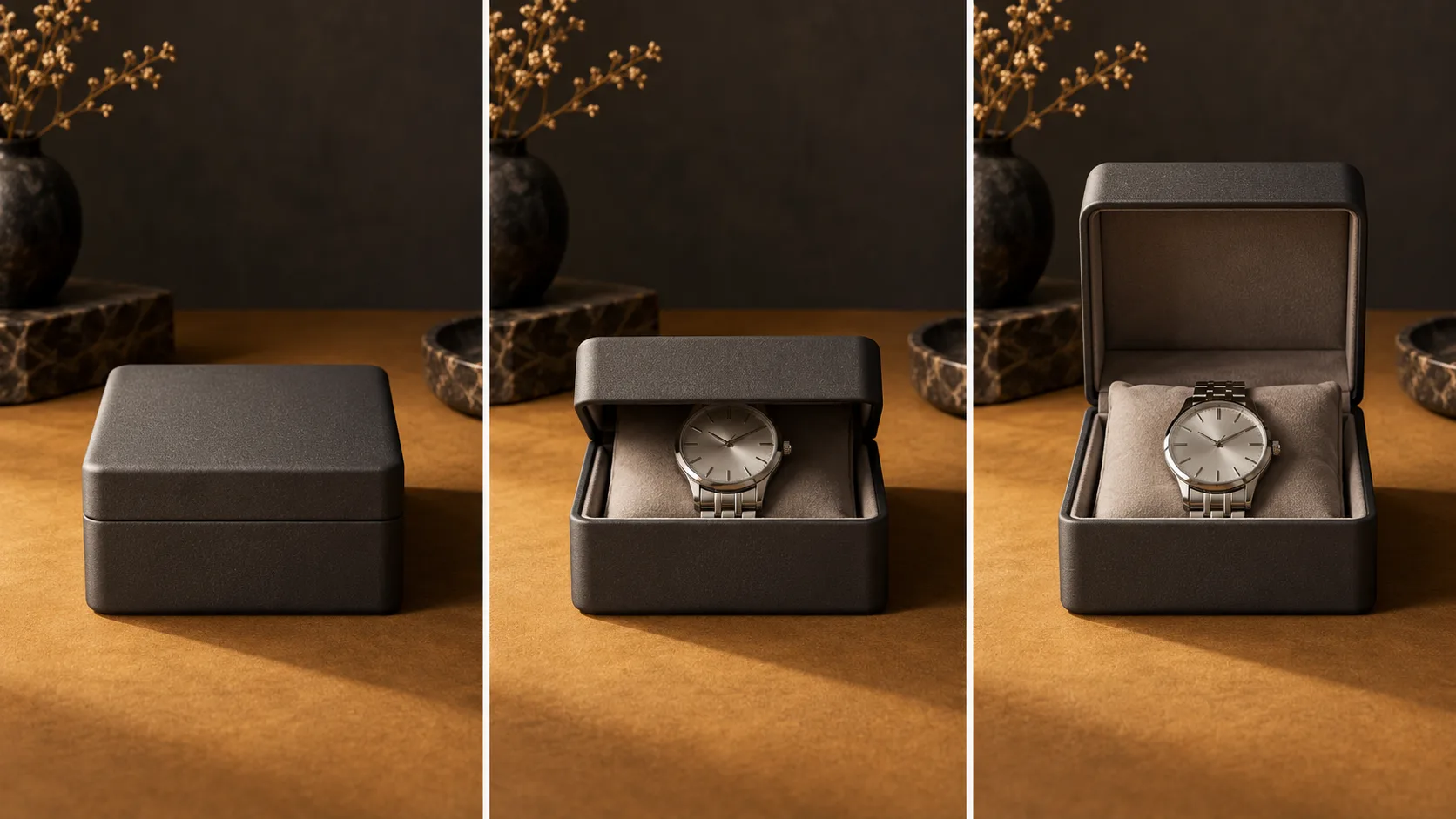
Consider a locked-camera shot of a watch in a presentation case. Prepare the following images:
- Start: the case is closed on a tabletop.
- Middle: the same case is half open, with the watch partly visible.
- End: the lid is fully open and the watch is revealed.
Keep the case, watch, camera position, background, and lighting consistent. The changing element should be the lid position. If the product shape or viewpoint also changes dramatically, you are asking for several transitions simultaneously.
For a five-second example, place the middle target at 2.5 seconds. That is an illustrative midpoint, not an optimal timing recommendation. If the reveal needs to happen early, choose an earlier interior time and leave enough room for the closing composition to develop.
The cover illustrates these three visual states. It does not prove the model can connect them successfully.
An example request body
Send the following illustrative input object to minimax/h3-max/reference-to-video using fal's authenticated client or playground. Replace all three placeholder URLs with your own accessible images. This example has been checked against the documented field structure, but has not been run as a generation.
{
  "image_url": "https://example.com/case-closed.jpg",
  "middle_image_url": "https://example.com/case-half-open.jpg",
  "end_image_url": "https://example.com/case-open.jpg",
  "middle_frame_time": 2.5,
  "duration": 5,
  "resolution": "768P",
  "prompt": "A locked camera observes a graphite watch case on a tabletop. The lid opens slowly and continuously, reaching the halfway-open pose around the middle of the shot, then settling fully open. Keep the watch, case, lighting and camera position consistent.",
  "prompt_expansion_mode": "disabled"
}
This is the input body, not a complete authentication script. Follow fal's client instructions to submit and retrieve the result. Avoid adding unrelated references to your first experiment; establish what the timed images contribute before increasing complexity.
Timed keyframes versus reference images
The schema describes reference images as subject/style guidance, while the middle image has a time target. Three ordinary references therefore do not express the same instruction as three timed frames.
Ask what each supplied image is doing. A character portrait can describe who appears in the scene. A halfway-open case describes a state you want during the scene. Separating those roles makes both your request and your evaluation easier to understand.
Write the prompt around the motion connecting the states. “Opens slowly and continuously” adds something the still images do not contain. A list of objects alone leaves the transition underspecified.
Check these issues before troubleshooting quality
A missing endpoint image, a middle time at zero or at the requested duration, and an unsupported resolution conflict with the documented input rules. Correct those before experimenting with more elaborate prompts.
If the request is accepted but the transition looks wrong, inspect the images themselves. Is the lid attached in the same place? Does the watch change shape? Is the camera angle stable? Revise the most obvious inconsistency first and rerun with the other settings unchanged.
If the URLs cannot be retrieved, check that the provider can access the actual image files. A webpage URL or a private link is not a useful substitute for an accessible image resource.
Evaluate the whole transition
Compare a first/last-frame version with a three-frame version using the same intended scene. Inspect the intermediate pose, motion before and after it, product shape, and final composition. Reaching one target is only part of a successful shot.
Listen separately for usable sound. Additional visual control does not establish better audio. Preserve the request and returned seed with each result so later experiments have a clear reference.
For three-frame controls, use fal's current endpoint. H3Vid's keyframes workflow currently serves first-and-last-frame generation, while reference-to-video serves reference guidance. Those workflows remain distinct from the new provider field described here.