

ジャヴァノ🍀ボカロP@初音ミク「w/39」10/12アルバムリリース · @javawock7618
Local H3 Workflow Mask Editor Demo
A creator demonstrates mask editing inside a personalized local H3 workflow, showing the editor and preview controls.
Prompt not publishedView details
Verified prompts and original sources
Study prompts published by real creators alongside their finished MiniMax H3 videos. See how scene direction, motion, camera work, continuity, and sound fit together.
Every example links back to its original source. Copy the published prompt as written or adapt its structure to your own scene.
706 verified examples
Browse MiniMax H3 examples by camera technique, storyboard, animation, reference control, music, dialogue or motion graphics. Published prompts and workflow-only examples are clearly identified.
214 examples found · Showing 121–150
Browse supporting MiniMax H3 workflows for ComfyUI, local inference, acceleration, video continuation and post-production. These entries are workflow and comparison examples rather than a library of copyable prompts. Follow the original sources for author-published settings and tooling, and compare quality as well as reported runtime. Hardware tests depend on their specific setup. Keep the same input and generation conditions when evaluating a change, and check whether the source provides enough detail to reproduce it.
ジャヴァノ🍀ボカロP@初音ミク「w/39」10/12アルバムリリース · @javawock7618
A creator demonstrates mask editing inside a personalized local H3 workflow, showing the editor and preview controls.
A creator turns faceless H3 Max Turbo previs into depth guidance for Seedance and removes a background reference to keep an anime look.
MiniMax H3 Max Turboノダッチ@NDT_AI研究所 · @challenger_ND
A creator turns faceless H3 Max Turbo previs into depth guidance for Seedance and removes a background reference to keep an anime look.
 MiniMax H3
LinacoWSL · @breath_in_code
A creator reports a 1344×768, fifteen-second H3 clip in under eight minutes on a 12 GB RTX 4070 Ti after a ComfyUI update.
Nami|EC運営×生成AI|商品ページ自動化の実験ログ · @NamiDesignWorks
A creator compares H3 rendering on RTX 3090 and 5060 Ti across four resolutions, excluding the initial warm-up run.
An MV workflow uses faceless H3 Max Turbo previs, converts it to depth and feeds Seedance to rebuild anime characters and backgrounds.
MiniMax H3 Max Turbotapehead.lab · @tapehead_Lab
An MV workflow uses faceless H3 Max Turbo previs, converts it to depth and feeds Seedance to rebuild anime characters and backgrounds.
 MiniMax H3
むぎ@まいにち寧々さん · @EverydayNene
A Colab A100 40 GB H3 test reports 177.77, 67.07 and 24.82 seconds at 1.0, 0.5 and 0.2 megapixels.
 MiniMax H3
Neo · @NeoAIForecast
A Hermes agent uses ComfyUI to assemble ten H3 clips, Qwen images and a 100-second MiniMax Music score on one Spark.
 MiniMax H3
StudioYebisu · @studio_yebisu
An author compares unmodified H3 on Colab against a modified local setup, presenting both outputs at half playback speed.
 MiniMax H3
posi_posi · @posi_posi8
A shared Colab notebook starts an H3 WebUI with one button; the author reports a five-second clip in under two minutes.

fal · @fal
Fal demonstrates H3 Max extending footage beyond its original frame to change aspect ratio while retaining timing and audio.
パジョカ (Pajoca) · @Pajoca_
A Windows FreeVideo v0.4.0 report generates a four-second 768×1344 image-to-video clip in 210 seconds on a 4070 Ti Super.
 MiniMax H3
AI Bard Guild · @IsekaiBardGuild
A side-by-side test uses H3 footage as a guide for Opus 5.5 to add expressions to a 3D character.
yanagid@AIイラスト/やなぎどさんち · @A2yanagid
Codex operates Eagle and H3 to derive a character sheet from older art, combine it with Kusatsu photos, then animate the result.
TOSHIBoo ꧁としぶ꧂全資産クリプト · @TOSHIBoo_m
A Colab production report separates setup, five H3 cuts and local export for a 30-second video using about 4.73 displayed CCU.
 MiniMax H3
Jenray · @jenray1986
An author reports a 15-second monk animation in ten minutes with INT8 H3 on an A100 40GB GPU.

Wonder Studios · @WonderStudiosX
Wonder Studios shares a two-hour H3 Max Turbo session in which community decisions shaped four films.
ジャヴァノ🍀ボカロP@初音ミク「w/39」10/12アルバムリリース · @javawock7618
A published H3 R2V workflow update adds Veda-Sparse support and switches extension resizing to native nodes.
 MiniMax H3
のりぞー@AI×副業 · @kikoru2357
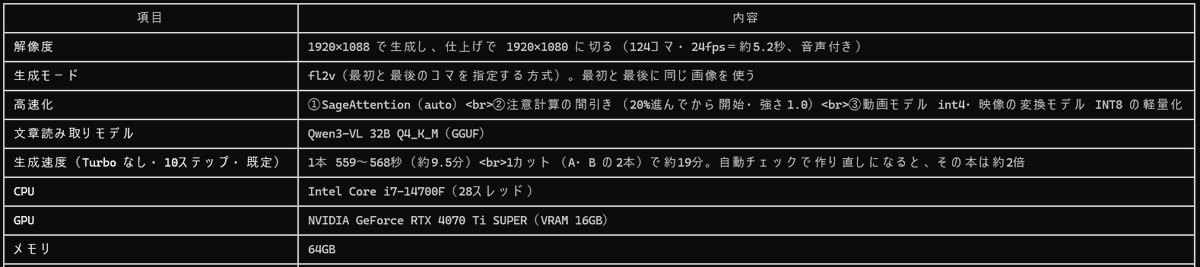
An H3 creator shares a settings screenshot and separates generation resolution from later batch interpolation and optional upscaling.

Lovis Odin · @OdinLovis
H3 Max gameplay concepts become 30 playable WebGL games through Claude, fal Agent and Three.js in a staged workflow.
 MiniMax H3 Max Turbo
ほこ|初月168万!AI×LINEスタンプ攻略 · @hoko525
A family-short workflow turns an age-themed Claude request into GPT Image stills, H3 Max Turbo video and an edited short.
Phantom|錬金学総論 · @Phantom_202601
A 5060 Ti 16GB H3 report records 15 seconds at 0.8MP in 11m40s, four-step breakdowns and checks for inactive LoRAs.

Amagami-lab | MOSOする人。 · @amagami_lab
A local PV Studio app combines character sheets, song analysis, H3 clips and ffmpeg editing on a 4070 Ti SUPER.
 MiniMax H3
Kamimoto(かみもと) · @sep_is_heim
A creator organizes 23 H3 custom nodes into six workflow groups covering extension, editing, audio, control and production support.
 MiniMax H3
Sam Wasserman · @SamJWasserman
A horror-style H3 LoRA offers VHS and 16mm looks, audio-aware training and ComfyUI text-to-video and image-to-video workflows.
 MiniMax H3
やっぱもちです。🐯 · @chimolog7
A Qwen3.8 Q3_S Strata chat workflow writes separate prompts and sends five H3 video jobs to ComfyUI, according to its author.
 MiniMax H3
中崎工房 | AIで1時間の仕事を5分で終わらせる人 · @nakazakifam
An automated influencer reel uses H3 for cat footage, LTX-2.3 for lip sync and Opus with HyperFrames for editing.
 MiniMax H3
AIconia | アイコニア · @AiPhotorealGirl
A ComfyUI H3 example pairs a 12-second square clip with an RTX 4070 12GB recipe using INT8 components and eight-step Turbo.
Phantom|錬金学総論 · @Phantom_202601
An M5 Mac H3 test reports fewer hand defects after removing two prompt sentences across three 15-second trials.
障ナイさん · @shonai_arai
A local workflow unloads Strata before H3 generation, then frees ComfyUI models and reloads the language model after completion.
烁皓 · @eternityspring
A Continuum workflow description uses 5–8-second chunks, audio/video latent handoff and resume support for longer H3 sequences.
Use the collection
Treat each example as a reusable structure. Keep the parts that control motion and continuity, then replace the creative details that belong to the original scene.
Browse a category or search by subject, camera technique, creator or model. Choose an example whose motion and structure match your intended video.
Copy the published text when available, checking whether it is a full prompt or a fragment. For examples without a prompt, study the source and adaptation notes.
Swap in your own subject and setting, provide the required reference media, and review every constraint before generating.
Copy a verified example, adapt the creative details, and generate your own video with MiniMax H3.