

 MiniMax H3
NookWright|AIイラストと動画 · @nookwright
FLUX Klein Still to H3 Fifteen Second Cat Clip
A creator animates a FLUX 3 Image Klein still into a 15-second H3 clip, including a cat sniffing a finger.
Prompt not publishedView details
Verified prompts and original sources
Study prompts published by real creators alongside their finished MiniMax H3 videos. See how scene direction, motion, camera work, continuity, and sound fit together.
Every example links back to its original source. Copy the published prompt as written or adapt its structure to your own scene.
706 verified examples
Browse MiniMax H3 examples by camera technique, storyboard, animation, reference control, music, dialogue or motion graphics. Published prompts and workflow-only examples are clearly identified.
214 examples found · Showing 151–180
Browse supporting MiniMax H3 workflows for ComfyUI, local inference, acceleration, video continuation and post-production. These entries are workflow and comparison examples rather than a library of copyable prompts. Follow the original sources for author-published settings and tooling, and compare quality as well as reported runtime. Hardware tests depend on their specific setup. Keep the same input and generation conditions when evaluating a change, and check whether the source provides enough detail to reproduce it.
MiniMax H3NookWright|AIイラストと動画 · @nookwright
A creator animates a FLUX 3 Image Klein still into a 15-second H3 clip, including a cat sniffing a finger.
 MiniMax H3
kz@AI術師【サブ趣味垢】 · @OpenPicGallery2
An app PR video delegates asset creation, H3 generation through ComfyUI and editing to Codex and Claude.
 MiniMax H3
AI Bard Guild · @IsekaiBardGuild
H3 front and side motion videos guide Opus rigging for a Tripo3D character, then the rig runs in a Unity map.
A same-seed H3 Turbo test uses first, middle and last style guides and publishes API graphs with observed transition limits.
MiniMax H3 Turbo紅 · @eikoung
A same-seed H3 Turbo test uses first, middle and last style guides and publishes API graphs with observed transition limits.
 MiniMax H3
Robin Delta · @heyrobinai
A HyperFlow tutorial pairs H3 demo clips with local CLI instructions and a same-seed baseline comparison option.

ComfyUI Dev · @ComfyUIdev
A ComfyUI Dev video demonstrates creating a RefMod for MiniMax H3 with paired character and source footage.

TOSHIBoo ꧁としぶ꧂全資産クリプト · @TOSHIBoo_m
A drama-style commercial combines Antigravity and Argon with Colab A100, H3 video and Gemini TTS.
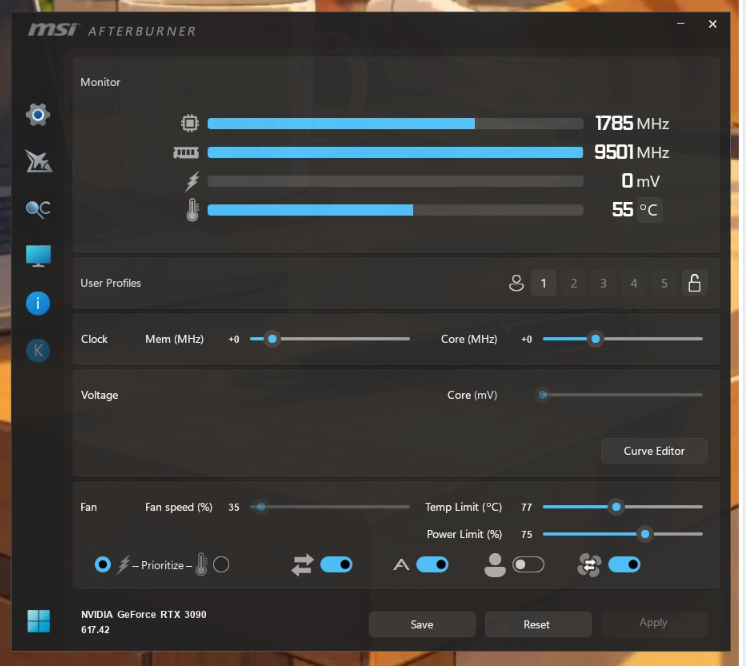 MiniMax H3
沉默的未知 · @hylwr
A local H3 user reports resolving reboots by reducing GPU power and Windows CPU performance limits.
 MiniMax H3
すーさん · @su_nagomi
A website promo uses Claude Code with Renoise H3 video, Seed Audio narration and Lyria music, then adds captions and edits.
 MiniMax H3
CALMDUST aka ちゃんこあ · @core_tan
A WebUI dev1.7 test compares SLA, Fast Spark, Spark and OFF on a four-step 1920×1088 H3 clip.

Enze Xie · @xieenze_jr
Sol-H3 Studio presents ComfyUI generation with native audio and reported RTX 5090 and DGX Spark timings.
 MiniMax H3
keys 🧪 · @u1tra_instinct
A TensorFold 2.8.0 studio update combines H3 Ref2VA, motion previs, audio tools and local production controls.

ダルトワ★TV · @MireilleDartois
An H3 long-form test combines four segments, Sage Attention, Easy Cache and an int8 VAE with reported resolution timings.
AI Video Explorer · @rand_shao
A linked H3 and Wan 3.0 Prime comparison uses the same clay creature, reference still and twelve prompts.

Kamimoto(かみもと) · @sep_is_heim
An H3 creator reports a fourteen-second clip in 98.8 seconds on RTX 4070, with faster reruns but weak speech quality.
 MiniMax H3
あきばあい | 秋葉原IT戦略研究所 · @akibaAIilab
A Vidubus workflow documents an FP16 video VAE workaround for reported Mac MPS failures with an int8 VAE.

akiraxx · @theeakiraxx
An H3 ComfyUI test compares twenty and eight steps, Spectrum acceleration and an AudioRefine pass for speech distortion.
デジタルクリエイティブAI · @DCAI_TW
A local Ref2VA comparison reports faster four-step Turbo generation alongside weaker reference control and visible noise.

フースイ@AIイラスト · @ai_t2i_231
A five-second H3 animation documents a conversational Codex workflow that assembled English instructions behind the scenes.
 MiniMax H3
きゅうす のAIとつれづれ · @Ai_Quse
A creator records DGX Spark memory and power during a long H3 workload, separating measurement from speed speculation.

SixteenGB · @SixteenGB
A 16 GB RTX 5070 Ti eGPU runs an H3 Ref2VA talking-cat example with int8, sparse attention and a four-step LoRA.
Feicai · @zhu185178
A six-stage short-drama tutorial compares H3 clip pricing with the time and iteration cost of finishing an entire film.
 MiniMax H3
码农暖爸 · @Delroy715
A same-seed H3 skin-rendering comparison combines two realism LoRAs, SigmaShift and a reported native 768p canvas.
 MiniMax H3
kongo jun / 混合 順 · @jun_kongo
A creator publishes a ComfyUI H3 latent-outpainting tutorial with an illustrated example and a linked video.

Hao AI Lab · @haoailab
A two-DGX-Spark 768p demo accompanies QAD-v2, eight-step audio/video sampling and two NVFP4 decoder options.
 MiniMax H3
Ueda · @megyo9
An H3 head-orbit video feeds MediaPipe triangulation, MakeHuman deformation, texture baking and VRM export.
 MiniMax H3
John · @Marmot0519
A 111-second shared film combines Comfy H3 video with several rounds of Claude-assisted caption refinement.
ジャヴァノ🍀ボカロP@初音ミク「w/39」10/12アルバムリリース · @javawock7618
An H3 R2V workflow update adds a Refer-LoRA toggle and advises disabling it for pure Ref2VA or hybrid models.
 MiniMax H3
CALMDUST aka ちゃんこあ · @core_tan
A WebUI dev1.7 test reports 2560×1440, 243 frames and six steps with FlashGen FL2V LoRA, taking 432.8 seconds.
 MiniMax H3
ダルトワ★TV · @MireilleDartois
A chained H3 test uses 22-frame latent handoffs and reports unwanted cuts and lights switching off between short segments.
Use the collection
Treat each example as a reusable structure. Keep the parts that control motion and continuity, then replace the creative details that belong to the original scene.
Browse a category or search by subject, camera technique, creator or model. Choose an example whose motion and structure match your intended video.
Copy the published text when available, checking whether it is a full prompt or a fragment. For examples without a prompt, study the source and adaptation notes.
Swap in your own subject and setting, provide the required reference media, and review every constraint before generating.
Copy a verified example, adapt the creative details, and generate your own video with MiniMax H3.