
BFS Character Swap is Alissonerdx's experimental MiniMax H3 LoRA for replacing a video's main subject with a character from a reference image. Its documented setup combines an aligned source-video guide with H3's native image-reference path. That distinction matters when choosing between a local guide-based workflow and an ordinary multimodal video reference.
This article follows the author's repository, Character Swap guide, supplied workflow, and weight license as reviewed October 14, 2026. We have not installed or tested the LoRA. The instructions below are documentation-based; the examples on the author's page are third-party demonstrations.
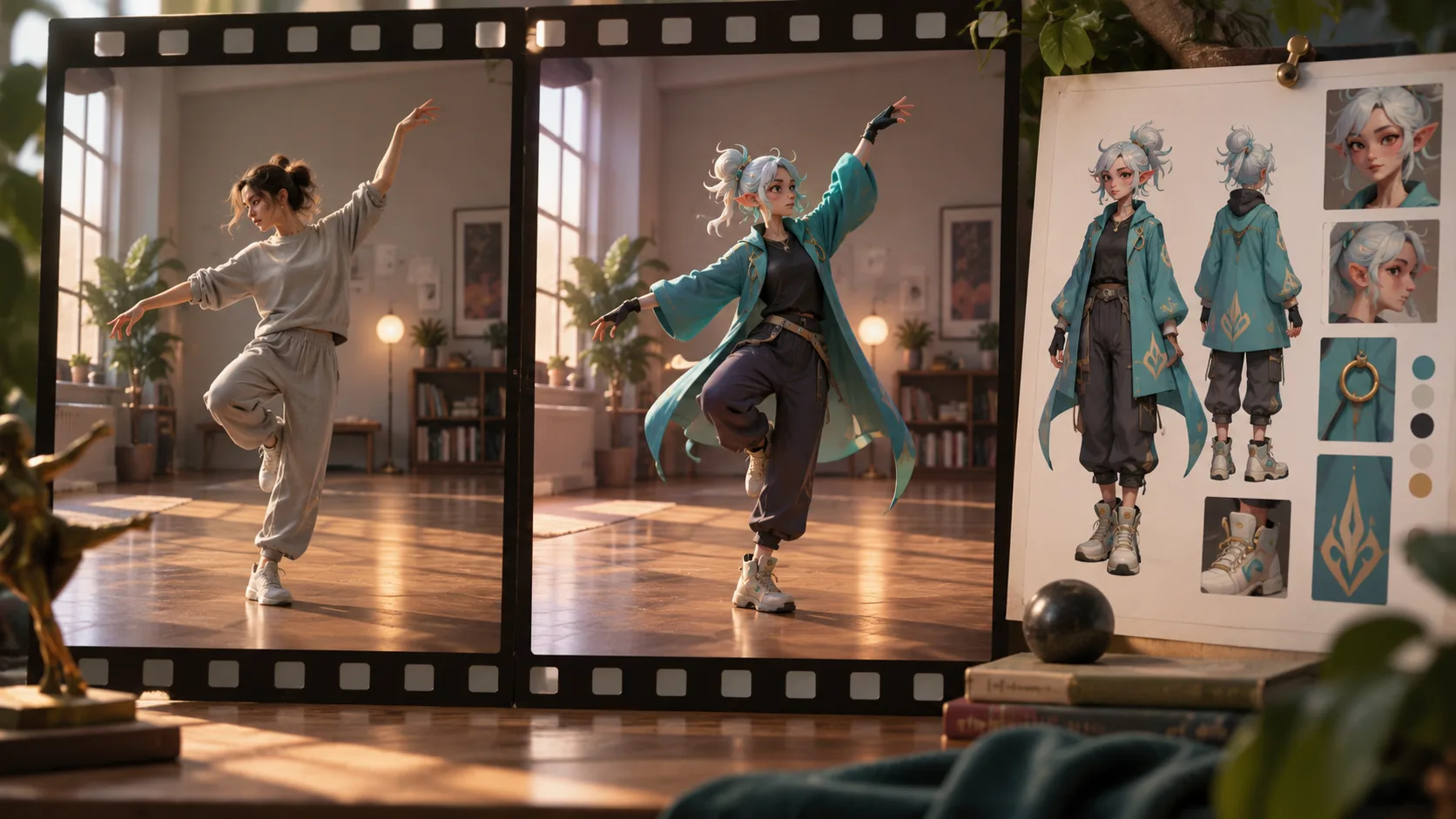
What the LoRA is trying to preserve
The source guide supplies scene layout, camera, pose, movement, and performance. The reference image supplies the replacement character's appearance. The model regenerates a video under those constraints. It does not paste a new face over unchanged source pixels, and it is not a guarantee of frame-perfect identity transfer.
This is distinct from the native reference workflow on our Character Swap page, which submits a source clip and character image as multimodal references. That online tool does not run this BFS checkpoint. Sharing the goal of character replacement does not make their conditioning paths or recipes equivalent.
The model also differs from the author's Head Swap LoRA. Character Swap aims at the main subject's appearance, including body and clothing; Head Swap focuses on a different replacement scope. Choose the weights and graph for the actual task before experimenting with combinations.
Which file should you download?
The primary release is minimax_h3_character_swap_v1.0_ref2va_r64_gl.safetensors. The included Character Swap workflow loads that file and recommends it as the starting point. The similarly named WIP checkpoint is an experimental alternative associated with 768-pixel training and step 250, not the default release.
Place the chosen file in ComfyUI/models/loras/. Open the supplied minimax_h3_character_swap_workflow.json, then inspect its model and node dependencies. A LoRA file alone is insufficient: H3 diffusion weights, text encoding, VAEs, guide preparation, and sampling must belong to a compatible graph.
For a comparison, keep the source, reference, prompt, seed, strength, and sampler stable while changing only the primary versus WIP weight. Different inputs or settings can overwhelm the checkpoint difference and make a visual comparison inconclusive. This is a suggested evaluation design, not a result obtained by H3Vid.
Add Guide is more specific than video reference
The recommended source input goes through MiniMaxH3AddGuide at frame_idx = 0. The LoRA was trained with guide-latent conditioning, which aligns source and generated video on a shared spatial and temporal grid. A general Video 1 reference does not establish that alignment automatically.
Send the replacement image through the native image-reference path as <Picture 1>. The source and image therefore have different jobs and enter different paths. Replacing both with two ordinary references loses the documented guide setup.
Keep the output aspect ratio and frame count aligned with the guide. The repository documents H3-supported counts following 17n + 5, including 73, 90, 107, and 124 frames. Account for the actual loader frame rate and selected range rather than relying only on a rounded duration label.
The optional Planner is a convenience, not a prerequisite. The author's instructions permit a native video loader connected to Add Guide without the Planner. When a downloaded graph has missing optional nodes, inspect those connections before assuming the weight requires an entirely different runtime.
Write a targeted body_swap prompt
Use the documented body_swap: prefix. Identify the reference character and the source person clearly, especially when several people are visible. Without explicit targeting, the model may select the most prominent subject.
An illustrative prompt could be:
body_swap: Replace the dancer in the gray outfit with the teal-coated character in <Picture 1>. Follow the guide dancer's pose, hand gestures, body movement, camera framing, and timing. Keep the room and other people consistent with the guide.This is a writing example, not an author-tested preset. Start with the supplied graph's LoRA strength and a short source range. Use a reference that shows the requested costume and silhouette. When only the head is visible in the image, missing body details must be inferred and may vary between frames.
Inspect hands, face, clothing edges, occlusions, and fast turns separately. A convincing first frame does not establish consistency through a difficult gesture. Keep the original guide for side-by-side replay so movement drift can be distinguished from a successful appearance change.
Audio selection and conditioning are separate
The guide explains two different audio operations. The Planner's Use video audio option selects the output soundtrack. Conditioning generation on audio additionally requires with_audio = true on BFS Shot H3 Conditioning or its Advanced counterpart.
Selecting a soundtrack alone therefore does not prove the model used audio during generation. If lip movement matters, confirm both the conditioning path and the final soundtrack. The authors describe combining Character Swap and Head Swap as experimental; possible lip-sync benefits are not established for every clip or setting.
What the license permits
The repository contains mixed asset licenses. The BFS Character Swap license applies to the named Character Swap weight files and derivative weights, not automatically to every other asset in the repository.
The author's license summary permits use in commercial videos and films without prior permission. It also specifies attribution for organizations above a US $1 million annual gross-revenue threshold and prohibits offering the LoRA as a hosted API, SaaS, or other remote model service. Check the full terms for your use; a permissive base-model or code license does not override these weight-specific conditions.
That hosting restriction is why an online product cannot simply register this checkpoint as another provider preset. Local production and remote model serving are different activities under its stated terms.
A practical first trial
Choose a short guide with one clearly visible subject, a well-matched full-character reference, and the primary weight. Preserve the supplied alignment and sampling recipe. Confirm guide frame count, source audio routing, reference numbering, and output path before generation.
If the result drifts, simplify the source range or improve the reference before changing several acceleration nodes at once. The authors report limitations around small faces, occlusion, lighting changes, difficult angles, and longer clips; animal references are less tested. Retain the exact graph and inputs with each output so the next attempt addresses a known variable rather than becoming a disconnected reroll.