
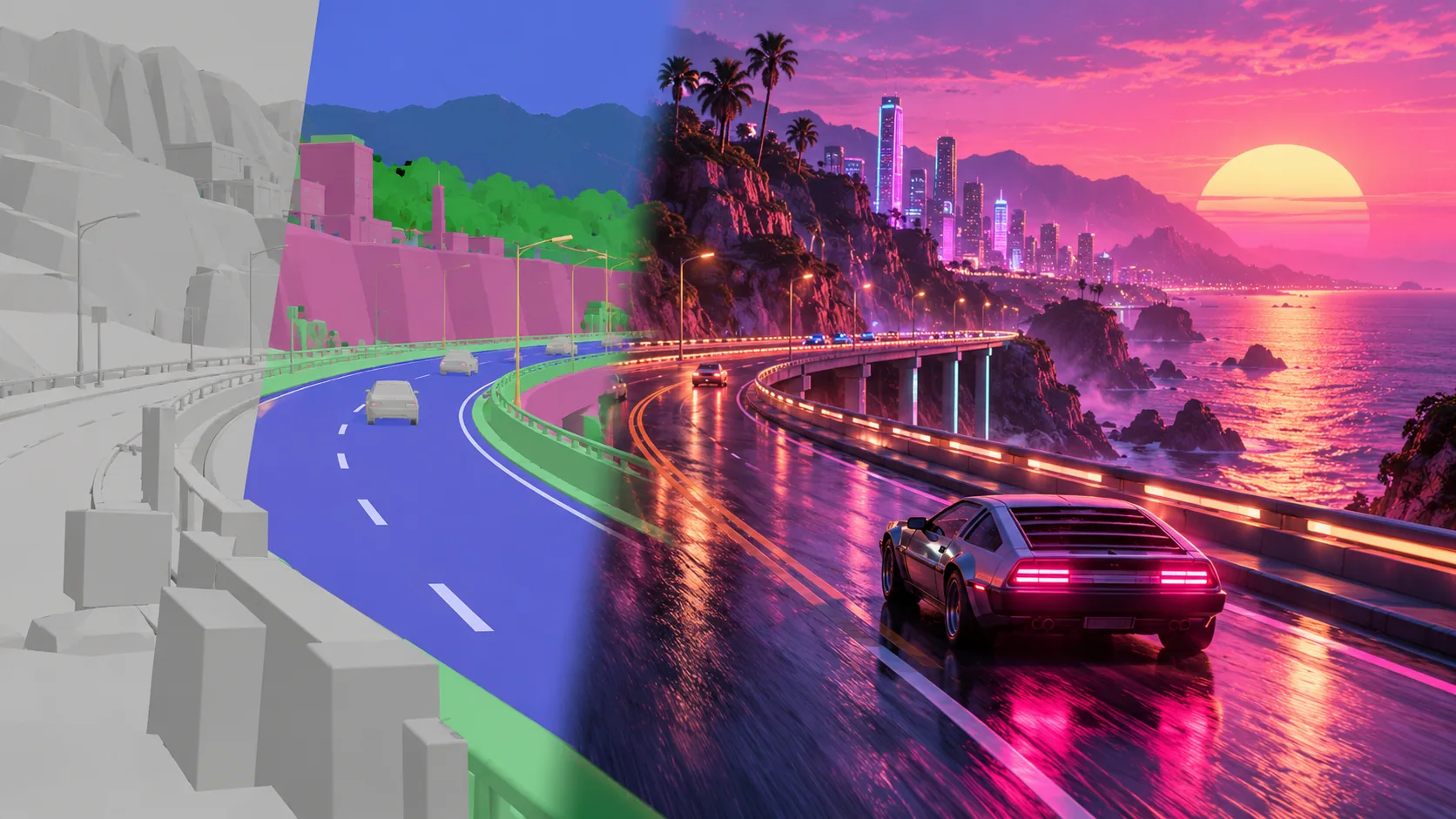
SolarRenderer converts a structure video into finished-looking footage using MiniMax H3 and two adapters. Its inputs can describe layout and motion with grey boxes, semantic maps, skeletons, depth or body meshes; a prompt and an optional first frame determine the appearance. The output is generated video, rather than an editable mesh or a recovered game-engine scene.
The project repository, inference guide and prompt guide are the basis of this article, reviewed October 20, 2026. This is a documentation-based setup guide. We have not installed the runtime or reproduced its speed and benchmark claims, and H3Vid does not currently run SolarRenderer.
Decide whether your input fits
The useful starting point is a video that already expresses the intended camera movement and action. A semantic road sequence can carry a driving trajectory; a grey-box animation can describe a room and moving actor. The rendering stage supplies visual appearance around that structure, so ambiguous geometry is still an ambiguous instruction.
The inference guide specifies 24fps and at least 158 frames, about 6.6 seconds. Its supported canvases are 1344×768 landscape and 768×1344 portrait. Other dimensions are resized and cropped. Before preparing a detailed prompt, check that the crop retains the important subject and that the structure actually shows the movement you want.
The current output contract is 158 frames at 24fps. Do not infer arbitrary length support from the presence of a streaming mode. Streaming changes how a clip becomes available; it does not automatically establish unlimited generation or interactive frame rates.
Prepare the appearance frame
A first frame is optional but recommended. It should depict the structure's opening camera, layout, character placement, pose and facing while introducing the intended materials and style. A beautiful image with a different camera angle can fight the structure rather than guide it.
For example, if your structure opens on a low camera following a small vehicle through a narrow street, keep that vehicle's position and the street's perspective in the appearance image. Change the grey surfaces into wet brick, neon reflections or illustrated ink, depending on your intended look. Avoid adding a second vehicle where the structure only contains one.
The project supplies helpers to extract frame zero, derive an image prompt and fit an image to the target canvas. These are preparation operations, not evidence that a particular image model will preserve the geometry perfectly. Inspect the prepared frame beside the original before committing GPU time.
Use the trained six-part prompt format
The authors emphasize their six-section structure: subject_definitions, summary, retention_analysis, detailed_description, overall_soundscape and non_diegetic_music. The final section is documented as N/A; it should not be treated as a promise of a separate music-generation pipeline.
Some sections use fixed sentences selected by the supplied caption skill and helpers. The free description is substantially longer, targeting 350–500 words. Its job is to describe the surfaces, lighting, characters and ordered events that the structure leaves open. Merely repeating “follow the video exactly” does not specify those missing properties.
A useful planning example is a semantic highway clip restyled as a rain-soaked night drive. Describe which colored regions are the road, vehicle and background; retain the lane trajectory and camera following distance; specify reflective asphalt, restrained signage and how the sky changes through the shot. That is an original planning example, not a tested prompt or a guarantee of signage accuracy.
Use the project's assembler and check.py validator to verify the file form. A valid prompt format does not guarantee a successful image, but it removes one avoidable source of incompatibility with the trained recipe.
Install the base and the matching adapter pair
The published install uses Python 3.10 or later, CUDA and FlashAttention. The guide records tested library versions and requires ffmpeg and ffprobe on the path. It estimates roughly 135GB for the base H3 files and 8GB for the adapters. These are downloads, not a stated consumer-VRAM minimum.
For ordinary rendering, download solarrenderer_control_lora.safetensors and solarrenderer_4step_lora.safetensors from the author's weight repository. Prepare the H3 base with scripts/prepare_h3.py, then invoke scripts/render.py with explicit base, control, few-step, structure, prompt and output paths. Add the first-frame argument when using the recommended appearance image.
Keep these two adapter roles separate. One supplies structure conditioning; the other supplies the four-step trajectory. The project's four-step adapter starts from DMAD, but that relationship does not make an arbitrary DMAD file a documented replacement for the released pair.
Streaming uses a different pair
The causal route requires both solarrenderer_causal_control_lora.safetensors and solarrenderer_causal_4step_lora.safetensors, together with --causal. Mixing a causal control adapter with an ordinary few-step adapter is not the published recipe.
The causal design emits blocks of roughly twenty frames after sampling them and maintains a cache of earlier generated context. It offers earlier visibility into a clip's progress. Measure time to the first visible block separately from total completion, and inspect boundaries for continuity before calling the result ready for editing.
What to verify before adopting it
The documentation gives approximately four minutes for encoding and three and a half for sampling on one GPU, without establishing that timing for your hardware. The headline reduction in sampling steps does not remove input encoding, loading or final delivery costs.
Review the full output for preserved camera trajectory, action order, missing objects and material stability. Keep the input clip, appearance frame, prompt, adapter names and seed with the render. For a hosted alternative, our 3D-to-video page uses a separately identified H3 Max task; it does not execute SolarRenderer's training, adapters or block-causal runtime.
Finally, the project explicitly distinguishes Apache-licensed code from H3-derived weight terms. Its README identifies territorial exclusions that include the EU, UK, Republic of Korea and US. Check the linked weight terms for your intended use before downloading or operating it. That restriction is particularly relevant to choosing an execution route for international users; open code alone does not establish worldwide weight availability.