

 MiniMax H3
Mira · @mirali6is
Crimson Hologram Dinner Short
A crimson surreal dinner scene pairs Midjourney 8.2 imagery with Hailuo H3 for a hologram-themed daily challenge.
Prompt not publishedView details
Verified prompts and original sources
Study prompts published by real creators alongside their finished MiniMax H3 videos. See how scene direction, motion, camera work, continuity, and sound fit together.
Every example links back to its original source. Copy the published prompt as written or adapt its structure to your own scene.
706 verified examples
Browse MiniMax H3 examples by camera technique, storyboard, animation, reference control, music, dialogue or motion graphics. Published prompts and workflow-only examples are clearly identified.
706 examples found · Showing 451–480
MiniMax H3Mira · @mirali6is
A crimson surreal dinner scene pairs Midjourney 8.2 imagery with Hailuo H3 for a hologram-themed daily challenge.
 MiniMax H3
Pierrick Chevallier | IA · @CharaspowerAI
An H3 demonstration describes animating source images that already contain typography for posters, title cards and branded visuals.
 MiniMax H3
AI Bard Guild · @IsekaiBardGuild
A side-by-side test uses H3 footage as a guide for Opus 5.5 to add expressions to a 3D character.
 MiniMax H3
Megaaziib · @megaaziib
A creator-trained H3 LoRA demonstrates a PlayStation 2-style cutscene with retro game rendering.
yanagid@AIイラスト/やなぎどさんち · @A2yanagid
Codex operates Eagle and H3 to derive a character sheet from older art, combine it with Kusatsu photos, then animate the result.
 MiniMax H3
竹花 樒 · @tshikimi
A lyric MV combines Blender previs, character sheets and H3 clips connected by reusing each prior ending frame.
 MiniMax H3
ヘミ · @Hemi3AI
An author compares blurry low-step H3 movement with a faster dance experiment intended to avoid shape melting.
 MiniMax H3
Megaaziib · @megaaziib
A creator demonstrates an H3 pixel-art style LoRA using recognizable game characters in a retro scene.
 MiniMax H3
久田誠良(Seira Hisada) · @SeiraHisada
An Argon-directed H3 MV uses four-step LoRA, lyric timestamps, 150 BPM beats and Python compositing rather than a video editor.
 MiniMax H3
さ🥺 · @_sagyoai
An original-character Attention dance video credits Opus 5.5 for choreography, staging and lyrics, Codex for images and H3 for video.
 MiniMax H3
neco - AI Anime · @neco1751662
A complete 15-second paper-craft fairy-tale prompt unfolds glowing bamboo, reveals Kaguya and releases golden origami cranes.
 MiniMax H3 Max Turbo
ほこ|初月168万!AI×LINEスタンプ攻略 · @hoko525
A 24-second short uses 18 GPT Image 2.5 stills and 11 H3 Max Turbo videos, with an author-reported 272-yen total and retries.
TOSHIBoo ꧁としぶ꧂全資産クリプト · @TOSHIBoo_m
A Colab production report separates setup, five H3 cuts and local export for a 30-second video using about 4.73 displayed CCU.
 MiniMax H3
ai三班李同学 · @benbaga4
A creator supplies their own narration while H3 supplies the on-screen actor and Opus 5.5 handles copy, editing and post.
 MiniMax H3
H.G.O.D. · @Jeuner
A locally made H3 experimental music video uses black-and-white ink and one red heart as its visual motif.
 MiniMax H3
Jenray · @jenray1986
An author reports a 15-second monk animation in ten minutes with INT8 H3 on an A100 40GB GPU.

さんかくてん · @sankakuten91256
A labeled comparison tests H3, Seedance and Wan against previs, depth, line art and a character reference in five-second sections.
 MiniMax H3 Max Turbo
阿川 · @achuanmemo
An Apothecary Diaries fan short uses H3 Max Turbo to stage Maomao and a troublesome bottle against a desktop setting.

mikumiku_aloha · @mikumiku_aloha
An Opus-directed funk MV pairs YuE2 music with a short Japanese instruction to make motion-graphics-heavy H3 video in ComfyUI.

Wonder Studios · @WonderStudiosX
Wonder Studios shares a two-hour H3 Max Turbo session in which community decisions shaped four films.

Yolanda · @YolandahGil
A Dove-inspired H3 ad uses multiple references to combine product continuity, voice-over and typography within its story.
Lavinia · @laviniavelle
A public H3 prompt stages a chip-bag accident and a laughing reaction among a woman, raccoon and capuchin in a moving car.

Veyra | AI & Tech · @VeyraWithAI
A 15-second H3 driving example combines a mountain road, heavy rain, falling rocks and a landslide from one text prompt.
ジャヴァノ🍀ボカロP@初音ミク「w/39」10/12アルバムリリース · @javawock7618
A published H3 R2V workflow update adds Veda-Sparse support and switches extension resizing to native nodes.
 MiniMax H3
のりぞー@AI×副業 · @kikoru2357
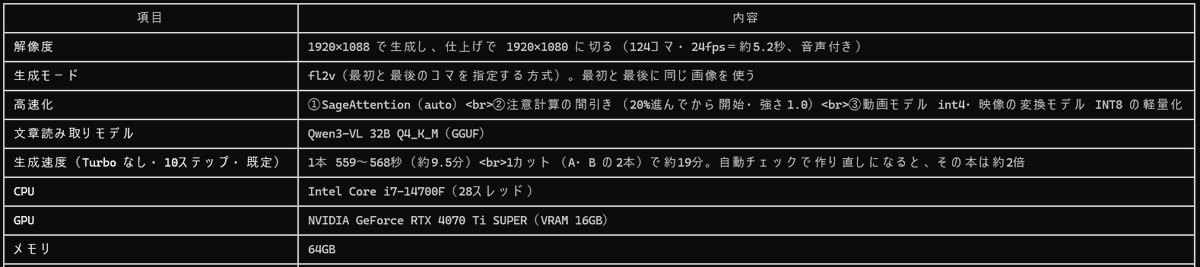
An H3 creator shares a settings screenshot and separates generation resolution from later batch interpolation and optional upscaling.

Lovis Odin · @OdinLovis
H3 Max gameplay concepts become 30 playable WebGL games through Claude, fal Agent and Three.js in a staged workflow.
 MiniMax H3
aicreataro · @aicreataro
A ten-second H3 run becomes seven material variants, then Python pose switching and Blender connect the 2D motion to a 3D reveal.
 MiniMax H3
マッド𝕏 ⌘MAD𝕏 · @madxfpv
An anime-style drone-race event opening revises aircraft and character motion using H3 alongside Suno, ChatGPT and Codex.
 MiniMax H3 Max Turbo
ほこ|初月168万!AI×LINEスタンプ攻略 · @hoko525
A family-short workflow turns an age-themed Claude request into GPT Image stills, H3 Max Turbo video and an edited short.
 MiniMax H3
Maurice Bourdon · @MauriceBourdon
A locally generated H3 fragrance concept places a perfume bottle in a richly lit miniature-world setting using ComfyUI.
Use the collection
Treat each example as a reusable structure. Keep the parts that control motion and continuity, then replace the creative details that belong to the original scene.
Browse a category or search by subject, camera technique, creator or model. Choose an example whose motion and structure match your intended video.
Copy the published text when available, checking whether it is a full prompt or a fragment. For examples without a prompt, study the source and adaptation notes.
Swap in your own subject and setting, provide the required reference media, and review every constraint before generating.
Copy a verified example, adapt the creative details, and generate your own video with MiniMax H3.