

 MiniMax H3
Glenn Williams · @GlennHasABeard
White Ink Ghost in a Locked Glass Shot
A fixed-camera H3 experiment revises white ink in dark water so a sinking drop stretches into a ghost before spreading.
Verified prompts and original sources
Study prompts published by real creators alongside their finished MiniMax H3 videos. See how scene direction, motion, camera work, continuity, and sound fit together.
Every example links back to its original source. Copy the published prompt as written or adapt its structure to your own scene.
706 verified examples
Browse MiniMax H3 examples by camera technique, storyboard, animation, reference control, music, dialogue or motion graphics. Published prompts and workflow-only examples are clearly identified.
706 examples found · Showing 601–630
MiniMax H3Glenn Williams · @GlennHasABeard
A fixed-camera H3 experiment revises white ink in dark water so a sinking drop stretches into a ghost before spreading.
「take7|AI動画ラボ」 · @KRhxLIrwOLxIjfU
A fictional cola ad comparison reports H3 as the only tested model to spell SORA COLA correctly on one line.
 MiniMax H3
Fairu 🕵️♂️ · @Fairu_90
An Ocean Network template test uses H3 text-to-video and synced audio for an unusual ASMR concept with a difficult viewpoint.
 MiniMax H3
きゅうす のAIとつれづれ · @Ai_Quse
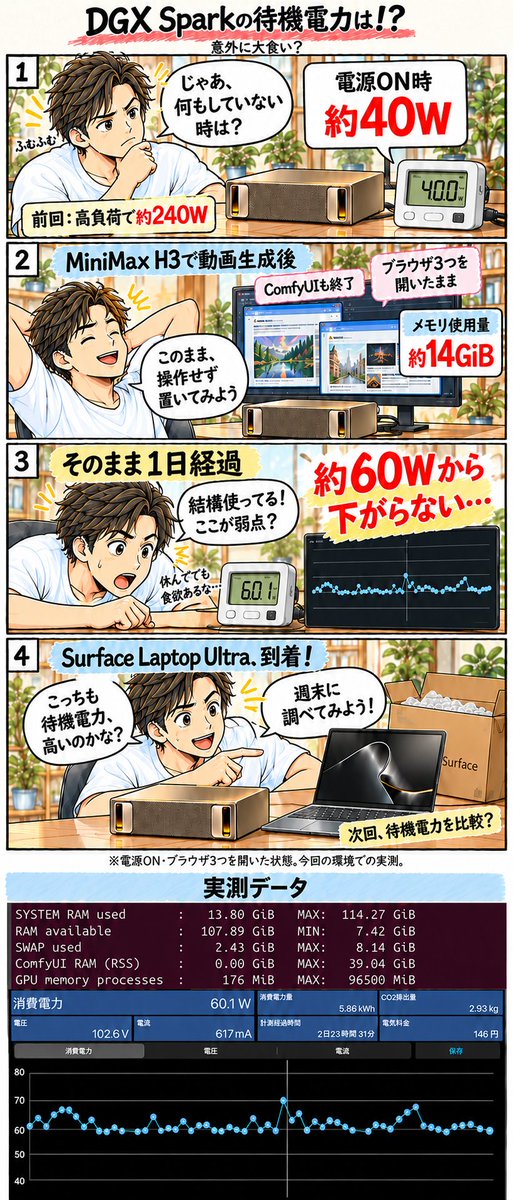
A creator reports roughly 60W idle draw after an H3 run and closing ComfyUI, compared with about 40W after power-on.
 MiniMax H3
たくぞー|AI動画ツール実測レビュー · @tkz_aiart
A side-by-side workflow uses H3 gray-character previs to guide blocking and timing in a Seedance 2.5 live-action finish.
 MiniMax H3 Max Turbo
sorastg524 · @sorastg524
An H3 Max Turbo fantasy clip pairs a moonlit fox-spirit character with deep red lantern light.
 MiniMax H3
ダルトワ★TV · @MireilleDartois
A video-reference test recommends lower-resolution dance guides for speed, while retaining detail for facial expressions and fingers.
 FastH3-QAD-v2 (MiniMax H3 derivative)
ata · @atasrb
A same-seed Tokyo test reports 18.6 versus 8.1 minutes on DGX Spark, with reduced small-text and facial detail in QAD-v2.
 MiniMax H3
taiti · @taitimusic
A vertical music promo uses H3 animation with Opus 5.5 and JIZURA text motion for a mobile-game presentation.
まぷて · @mapte_fireball
A creator builds a small app to trim long reference videos to selected sections under 15 seconds and reduce their resolution.
 MiniMax H3
みと Visuals×AI · @mito_ai_la
An H3 city-sky action study tests gliding movement and camera paths among urban buildings.
 FastH3 Omni (MiniMax H3 derivative)
Jiao Dong · @jd_markovchain
A Nuva Lab creator presents a shot-by-shot short made with FastH3 Omni and a creative agent over two afternoons.
 MiniMax H3
Md Ismail Šojal 🕷️ · @0x0SojalSec
A local H3 clip demonstrates an Anya Taylor-Joy likeness using a published 155MB LoRA and no reference images.
 MiniMax H3
tazmannner · @tazmannner
A creator’s H3 hires-fix node renders near 1MP before upscaling to 1080p, reporting 492 to 237 seconds versus native 2MP.
 MiniMax H3
StarSource · @StarSourceH
A creator adds a self-speaking video reference to H3 and reports less exaggerated mouth motion at a higher 1.2MP setting.
 MiniMax H3
Alessandro Fazenda · @adrfazenda
A local H3 experiment uses a Claude-created workflow for an extended staged conversation clip.
 SolarRenderer (MiniMax H3 derivative)
Guian Fang · @Enderfga
SolarRenderer uses H3-based control and distilled LoRAs to restyle engine structure passes with a reference first frame.
 MiniMax H3 Max
Kōrerotronix · @Amurinoble
An eight-second H3 Max title-card example uses a Transformers space setting for an animated franchise-style reveal.
 MiniMax H3
zev · @zevoo
A creator combines a Suno song with H3 visuals in an extended music video whose preview features a dewdrop on grass.
 MiniMax H3
PhotoX86 · @PhotoX86
A roughly 30-second H3 segmented-video attempt builds a comedy premise around finding a restroom.

robert. · @robrtcode
A surfer demonstration uses Pruna’s H3-based reference model to keep the subject and board consistent across changing angles.

Glenn Williams · @GlennHasABeard
A fixed low camera frames a corn row while a short prompt isolates invisible bootprints; the creator describes correcting their direction.

Alice The Ai Expert · @AliceInfoAi
A labeled three-model collage comparison contrasts oversized letters, cutouts and eyes, with MiniMax H3 in the middle panel.

Higgsfield AI 🧩 · @higgsfield_ai
A labeled split-screen compares rotating feathered wings in H3 and Claude Opus 5.5, focusing on detail, lighting and depth.
 MiniMax H3
びおめた · @malariadx
A ComfyUI example uses a TextGenerate node with an H3-oriented system prompt and pairs its workflow screenshot with an anime clip.

Glenn Williams · @GlennHasABeard
A locked window shot defines a handprint as untouched glass while frost spreads from one corner in one direction.
 FastH3 Omni (MiniMax H3-based)
buchi_ · @mix_buchi_
An anime-action test documents the creator’s concerns about limited motion and stereo width in an eight-step FastH3 Omni result.
 FastH3 Omni / MiniMax H3 + LightX2V Ref2V Turbo
まぷて · @mapte_fireball
A shared-reference, prompt and seed comparison reports 301s for Omni and 313s for LightX2V Ref2V Turbo at 1024×576.
 MiniMax H3 / FastH3 Omni
🟢DeepForest_Studio_AI🟢 · @DeepForest_Inc
A five-second R2V test compares base H3, Omni, Kitchen and VSA, reporting faster renders alongside facial artifacts.

EasyChen · @easychen
A creator’s 22-shot short-drama study reports improved voice similarity and faster-motion clarity, with wardrobe leakage onto extras.
Use the collection
Treat each example as a reusable structure. Keep the parts that control motion and continuity, then replace the creative details that belong to the original scene.
Browse a category or search by subject, camera technique, creator or model. Choose an example whose motion and structure match your intended video.
Copy the published text when available, checking whether it is a full prompt or a fragment. For examples without a prompt, study the source and adaptation notes.
Swap in your own subject and setting, provide the required reference media, and review every constraint before generating.
Copy a verified example, adapt the creative details, and generate your own video with MiniMax H3.