


Oddar · @don56palmer
Blockhead Chain Comic Dialogue
An original comic page becomes a voiced Japanese joke about monsters buying an energy drink.
Verified prompts and original sources
Study prompts published by real creators alongside their finished MiniMax H3 videos. See how scene direction, motion, camera work, continuity, and sound fit together.
Every example links back to its original source. Copy the published prompt as written or adapt its structure to your own scene.
706 verified examples
Browse MiniMax H3 examples by camera technique, storyboard, animation, reference control, music, dialogue or motion graphics. Published prompts and workflow-only examples are clearly identified.
706 examples found · Showing 121–150
Oddar · @don56palmer
An original comic page becomes a voiced Japanese joke about monsters buying an energy drink.

CALMDUST aka ちゃんこあ · @core_tan
A WebUI example stacks character images into one video reference and combines character and audio RefMod with FlashGen.

Mike Pevzner · @Mike_Pevzner
A creator shares a family-involved Recast demonstration, linked to fal’s H3 Max character replacement announcement.

M7[mi7]AI · @mi7_crypto
A five-part game promo reconstructs a ruined comic city into CG, flowers and a cyber forest through scanlines and spatial slices.

kuripon · @malonpon
H3 Max uses an AI-generated 3D hand-dance previs and character sheet to test face fidelity at awkward camera angles.

NOBU · @nbykos
An H3 Max versus H3 example reports unexpected cuts despite identical references and a single-shot instruction.

🟢DeepForest_Studio_AI🟢 · @DeepForest_Inc
A side-by-side test compares INT8 ConvRot, Standard and LynnReal Light VAE processing after the same H3 sampler conditions.

shi3z · @shi3z
A local H3 demonstration on DGX Spark reports roughly twice the speed using training-free Layer Adaptive SLA.

Kamimoto(かみもと) · @sep_is_heim
An RTX 4070 I2V example reports 124-frame TaoMate H3 output in 2:26, with a follow-up publishing its ComfyUI optimizations.

葦沢かもめ · @AshizawaKamome
A three-panel test compares H3 dance footage, motion applied in Blender and an overlay of both results.

Glenn Williams · @GlennHasABeard
A locked bottle-height camera holds on a bubble growing to watermelon size before it detaches and floats upward.
ぽむ · @pompompokopomch
A dark phone-loop music video explores clay and gummy textures with chant, Jersey Club and heavy 808 drone styling.

Alvaro Somoza · @OzzyGT
Two short game-clip examples use MiniMax H3 to generate sound effects from visual references.
Greg Horvay · @greg_horvay
An Intel B70 H3 workflow reports a 1344×768, 107-frame Ref2VA clip dropping from 42 minutes to about nine.

Sparkful · @SparkfulArt
A vampire scene compares a six-second H3 Max clip with a seven-second Seedance 2 clip for visuals and spoken dialogue.

The Rogue AI · @TheRogueA1
A creator uses MiniMax H3 inpainting to insert themself into a recognizable Ripley scene from Alien.

さいり🥚AI Creator · @sairin_hamumu
A semi-automated TapNow workflow aims to remake H3 lyric music videos by replacing the lyrics without planning every cut.

Shami · @ShamiWeb3
A wolf splashes a rabbit’s tiny convertible, setting up a larger and wetter revenge gag made with H3 on TapNow.

Bilal · @deepwhitman
A piano-led dance piece explores movement and emotional expression using H3 Max and Max Turbo with Opus direction.

Kent Dhani · @kentdhani
A local Ref2V tracking shot keeps one airport arrival in focus amid bodyguards, fans, paparazzi and flashing cameras.

Soran · @Soranlan
A 15-second POV sword-flight prompt tests continuous physical motion; the author reports poor transfer from Seedance-style prompting.

Xanderwow · @Xanderwow_A
A widely viewed H3 counterattack short from Xanderwow demonstrates a reversal-based action premise.

T · @tkvtk
A Japanese H3 study tests dolly zoom, rack focus, golden-hour lighting and swirling ink across realistic and anime footage.

Ima Studio · @ImaStudio_ai
Ima Studio compares H3 and Seedance 2.0 Mini on one 15-second aircraft story with shared characters and prompts.

Jonathan Fischoff · @jfischoff
An H3 Max Insert Video demonstration presents the author’s video-editing result in a longer source clip.

혼나고랩 · @honnago
A local H3 Max recreation adapts a published Korean campus DV-vlog prompt and includes Korean speech on dual RTX 3090s.

Inner-Reflections · @InnerRefle11312
A local H3 demonstration explores temporal upscaling as a way to improve generated video results.
 MiniMax H3
ゆずき · @uzuki425
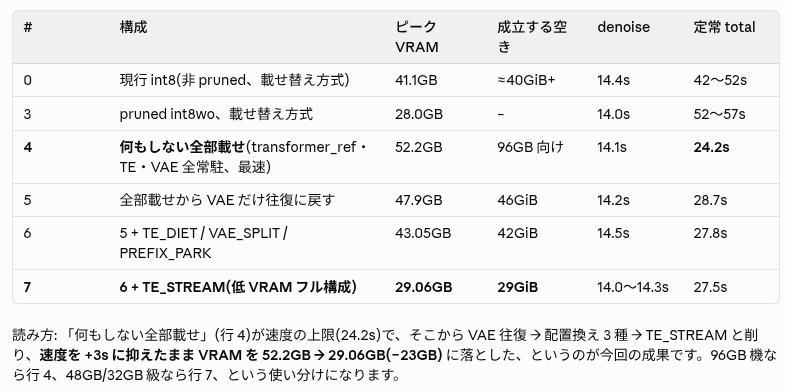
A Japanese H3 experiment shares a memory-optimization table and contrasts optimized execution with slower low-VRAM offloading.
 MiniMax H3
Kamimoto(かみもと) · @sep_is_heim
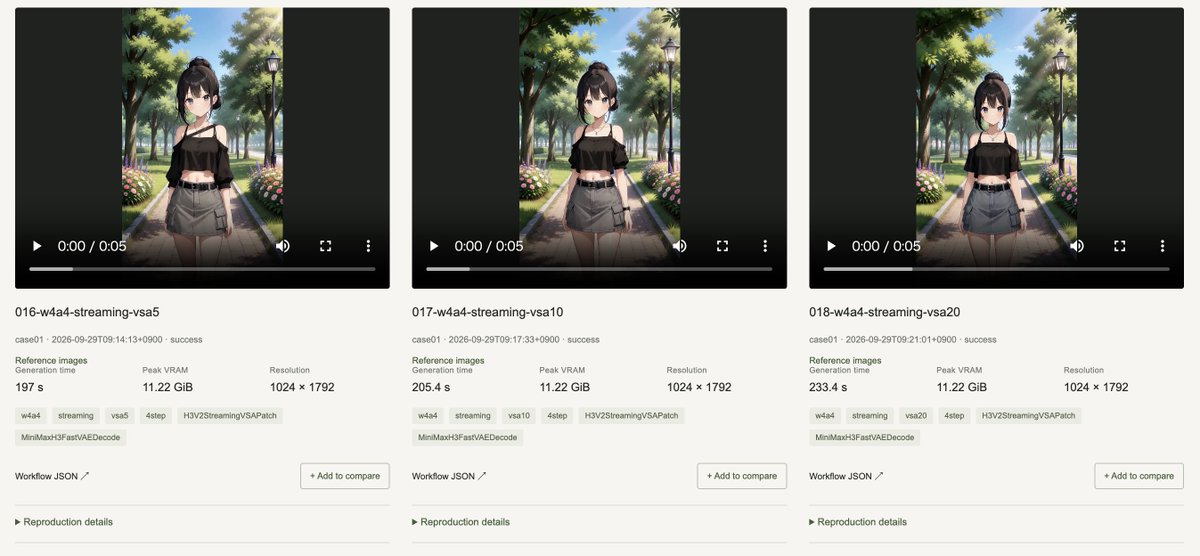
A 12GB RTX 4070 benchmark library compares Ref2VA and FL2VA outputs and provides downloadable generation workflows.

ρŁ𝐀𝔰Mʘ · @plasm0
A wordless synesthesia music video combines local H3, Seedance 2.5 and Suno v6 to explore sound as color.
Use the collection
Treat each example as a reusable structure. Keep the parts that control motion and continuity, then replace the creative details that belong to the original scene.
Browse a category or search by subject, camera technique, creator or model. Choose an example whose motion and structure match your intended video.
Copy the published text when available, checking whether it is a full prompt or a fragment. For examples without a prompt, study the source and adaptation notes.
Swap in your own subject and setting, provide the required reference media, and review every constraint before generating.
Copy a verified example, adapt the creative details, and generate your own video with MiniMax H3.